
Merchant Purchase Terminal: A Practical Guide for 2026
You're at the register, the customer taps a card, the screen flashes approved, and everybody moves on. That moment looks small, but the merchant purchase terminal sitting between the card and your business is doing far more than taking payment. It's the front door of your payments stack, the point where authentication, routing, authorization, and recordkeeping all start to matter.
Treat it that way and the device stops looking like hardware clutter. It becomes the place where you protect revenue, preserve dispute evidence, and keep reconciliation from turning into guesswork. In U.S. card payments alone, that front door handled 153.3 billion transactions worth $9.76 trillion in 2022, and most of them already involved chip, PIN, or contactless methods (Federal Reserve Payments Study).
What a Merchant Purchase Terminal Actually Does
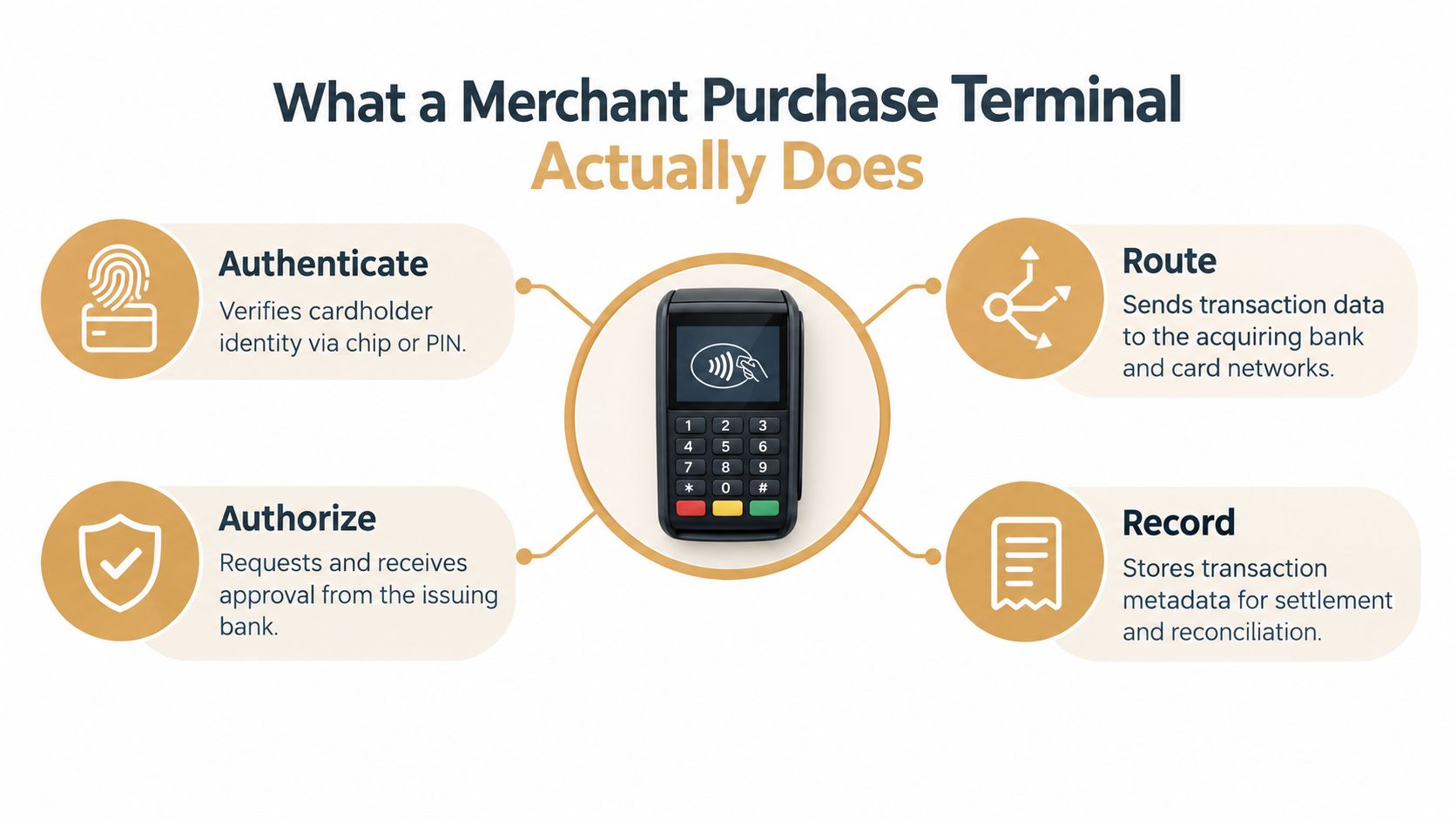
The clearest way to understand a terminal is to follow one sale. A shopper taps a card or phone, the terminal reads the payment data, the issuer decides whether to approve the charge, and the merchant gets a response back in seconds. The terminal then stores the details that let your processor, accounting team, and dispute workflow make sense of the sale later.
That's why the word terminal covers more than a countertop box. It can mean a traditional card reader on a checkout lane, a tablet-linked device on a restaurant table, or even a virtual terminal where someone keys in a phone order from a browser. In every case, the same basic job stays the same, turn a checkout moment into an authenticated payment transaction.
Why this matters beyond the cash drawer
A terminal doesn't just move money, it creates evidence. The approval response, the timestamp, the terminal ID, and the payment method all become part of the record you use later for settlement, reconciliation, refunds, and chargeback review.
Practical rule: if a payment problem later becomes a dispute, the terminal record is usually the first thing you wish had been cleaner.
That's why it helps to think of the terminal as the boundary between the buyer's payment instrument and your financial system. It's not a passive reader. It's the device or software layer that lets card-present and card-not-present commerce connect to the same acquirer, processor, and records.
The Main Types of Terminals and When Each One Fits
Most merchants aren't choosing between “a terminal” and “no terminal.” They're choosing between a few deployment models that solve different checkout problems. The right answer depends on where the sale happens, how often staff move, and whether the transaction starts in person or through a browser.
Fixed, mobile, and virtual terminals
A fixed countertop terminal fits walk-in retail, hospitality desks, and other places where the checkout point stays put. It's the simplest to supervise, and it usually makes the most sense when the lane, register, or host stand is stable. A mobile or portable terminal fits curbside pickup, tableside service, field visits, and line-busting because staff can carry it where the customer stands.
A virtual terminal works differently. It's a browser-based payment screen used for phone orders, mail order, back-office billing, and subscription support teams that need to key in a card without a physical device. For many merchants, the operating model is hybrid, a physical terminal for card-present sales and a virtual terminal for orders taken remotely.
Operational test: if the customer and the card aren't in the same place, a virtual terminal may be the cleaner fit than forcing the transaction through a device that was built for the counter.
Here's a quick comparison you can keep handy:
| Terminal type | Best for | Connectivity | Typical setup |
|---|---|---|---|
| Countertop POS terminal | Fixed checkout counters | Ethernet, Wi-Fi, or cellular fallback | Register-lane hardware with receipt printer and PIN entry |
| Mobile or portable terminal | Curbside, tableside, field service | Wi-Fi or cellular | Handheld device, tablet pair, or compact reader |
| Virtual terminal | Phone orders, mail orders, back-office billing | Browser and processor access | Staff log in through a web screen and key the payment |
The important point is that the “best” terminal is the one that matches how your customers buy. If the payment flow doesn't match the sales flow, staff will improvise, and that's where errors start.
How a Transaction Actually Flows from Tap to Settlement
A successful card payment has a rhythm, and most reconciliation problems come from people skipping one of the steps. First, the terminal reads the card data. Then the payment kernel selects the right application and sends the authorization request. After that, the issuer sends back an approval or decline, and the terminal saves the response along with the metadata.
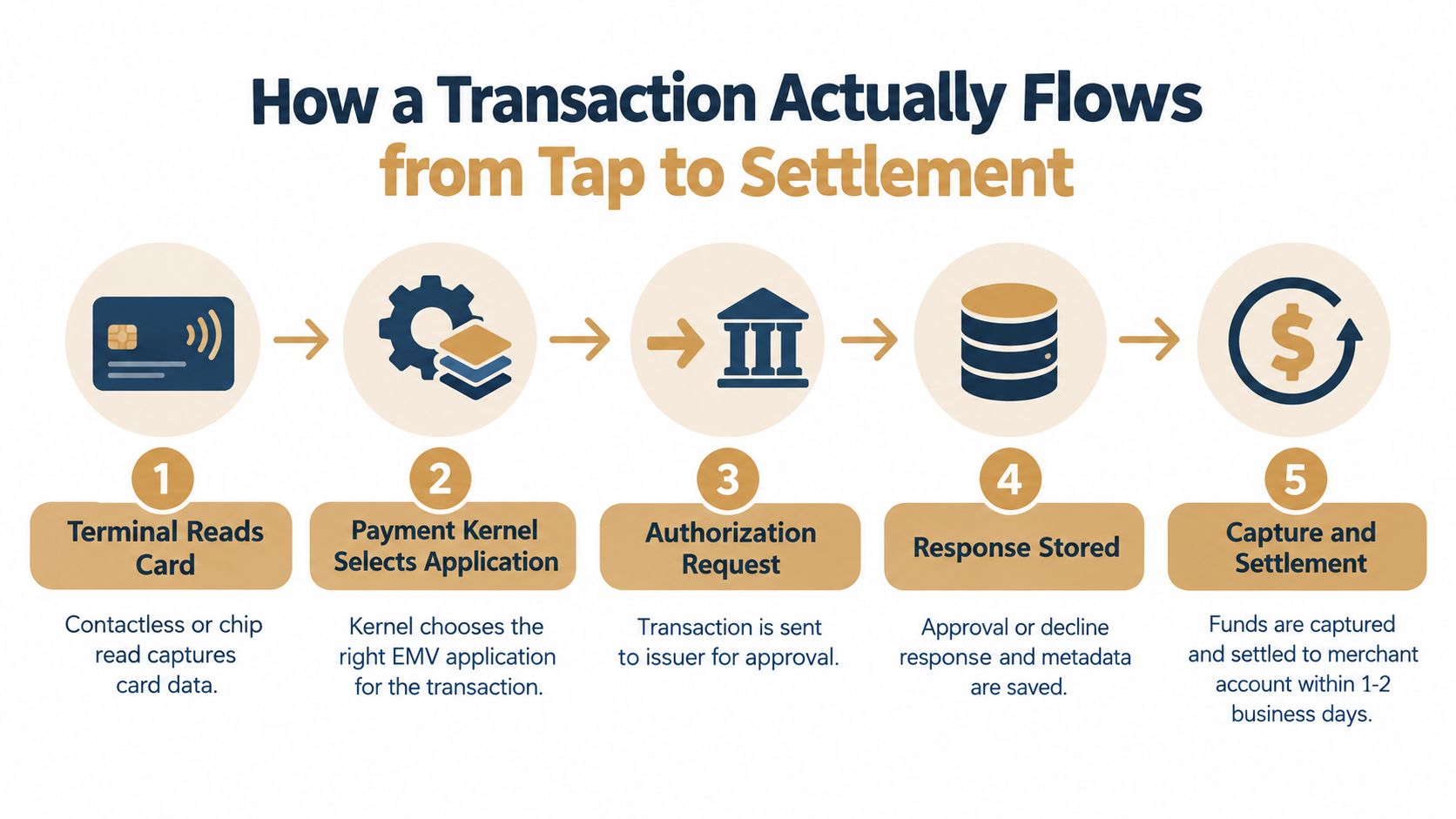
The part merchants underestimate is the record the terminal keeps. That record isn't just a receipt. It's the trail that shows what happened, when it happened, and which device handled it. If a sale later needs a refund, reversal, or dispute review, that trail is often the difference between a clean investigation and a messy one.
Where mistakes usually begin
The first weak point is authorization. If the terminal doesn't send the right data, the issuer may decline a transaction that should have gone through. The second weak point is capture timing, because delayed batch handling can leave staff unsure whether a payment settled.
The third weak point is record quality. A merchant that can't match a terminal ID, amount, timestamp, and response code to a specific sale has a harder time answering basic questions from accounting or disputes teams. That's why terminal data matters long after the tap.
EMV, PCI, and the Security Boundary You Actually Own
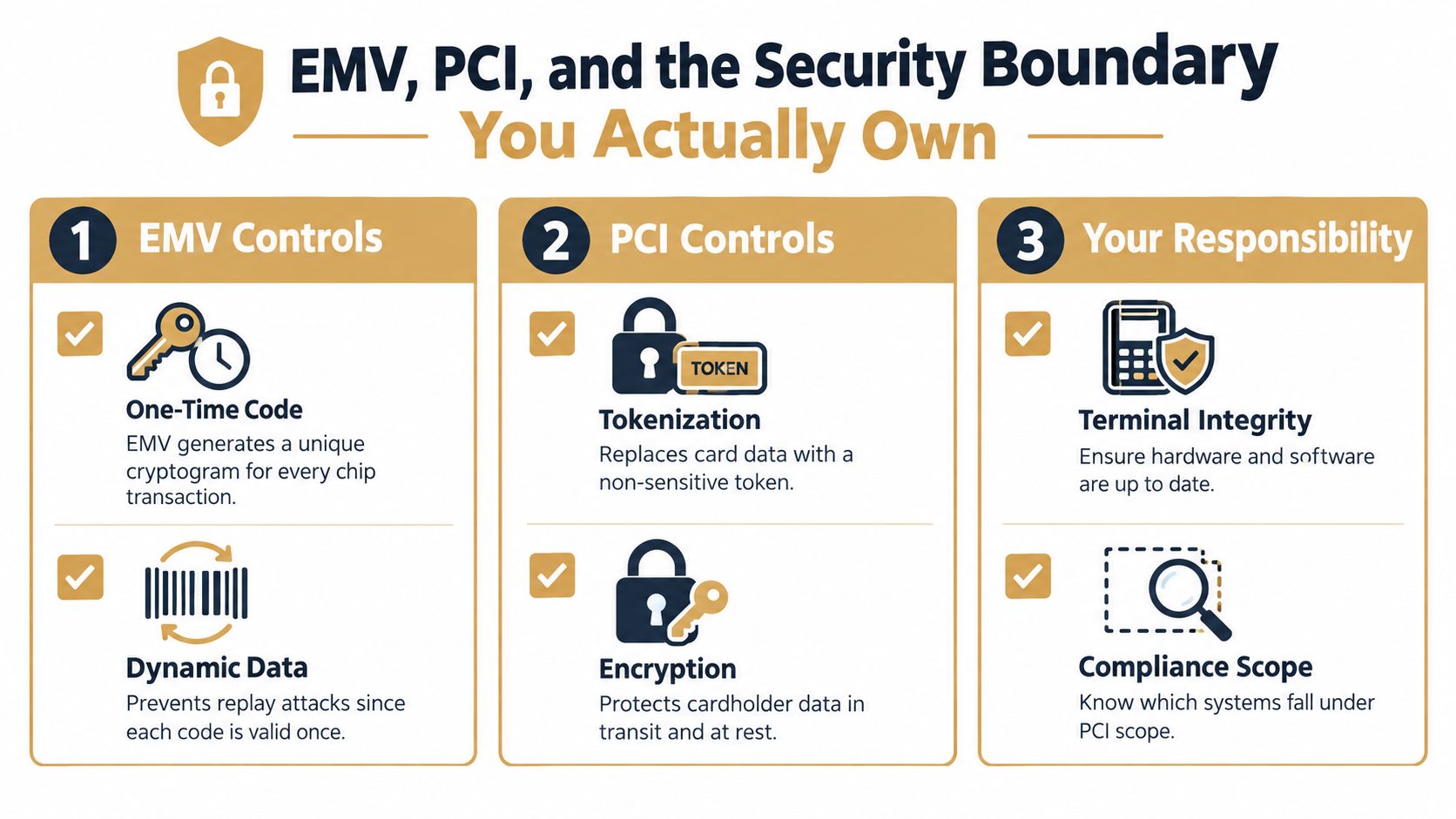
At the counter, the terminal is the front door to the payments stack. It is also a security boundary. In chip and contactless transactions, the terminal and card exchange transaction data that produces a one-time security code, which makes copied magnetic-stripe data far less useful for counterfeit point-of-sale fraud. Contactless acceptance also depends on the kernel, which handles supported card or device capabilities, risk checks, and the cryptographic exchange with the issuer.
That matters because the merchant owns part of that boundary whether they plan for it or not. EMV and PCI are often discussed as compliance topics, but in practice they decide whether the terminal can handle payment data cleanly and consistently. If the device, software, or network around it is sloppy, the security story breaks quickly, and the effects show up in authorization quality, dispute exposure, and reconciliation accuracy.
What merchants actually need to check
PCI SSC requires payment terminals to appear in the merchant's inventory of point-of-interaction devices and to be reviewed during every PCI DSS assessment, and transmitted account data has to be rendered unreadable before it leaves the terminal or connected system (PCI SSC FAQ 1301). Device-level approval alone does not cover the merchant's software, network, or refund workflow.
The practical checklist is straightforward:
- Verify EMV and NFC support: make sure the terminal can handle the contact and contactless methods your customers rely on.
- Keep kernels and applications current: certified software is not a one-time install, it needs maintenance.
- Replace default passwords: generic credentials turn a payment device into an easy target.
- Restrict admin access: only the people who require terminal control should have it.
- Segment the terminal network: payment devices should not share a flat network with general office systems.
- Document the encryption boundary: know exactly where protected payment data becomes unreadable and where processor responsibility begins.
If your checkout flow also accepts wallet payments, a useful reference on how syncs with Apple Wallet can help your team see where mobile payment behavior fits into the broader stack.
Where Disputes Begin and How Alert Platforms Fit In
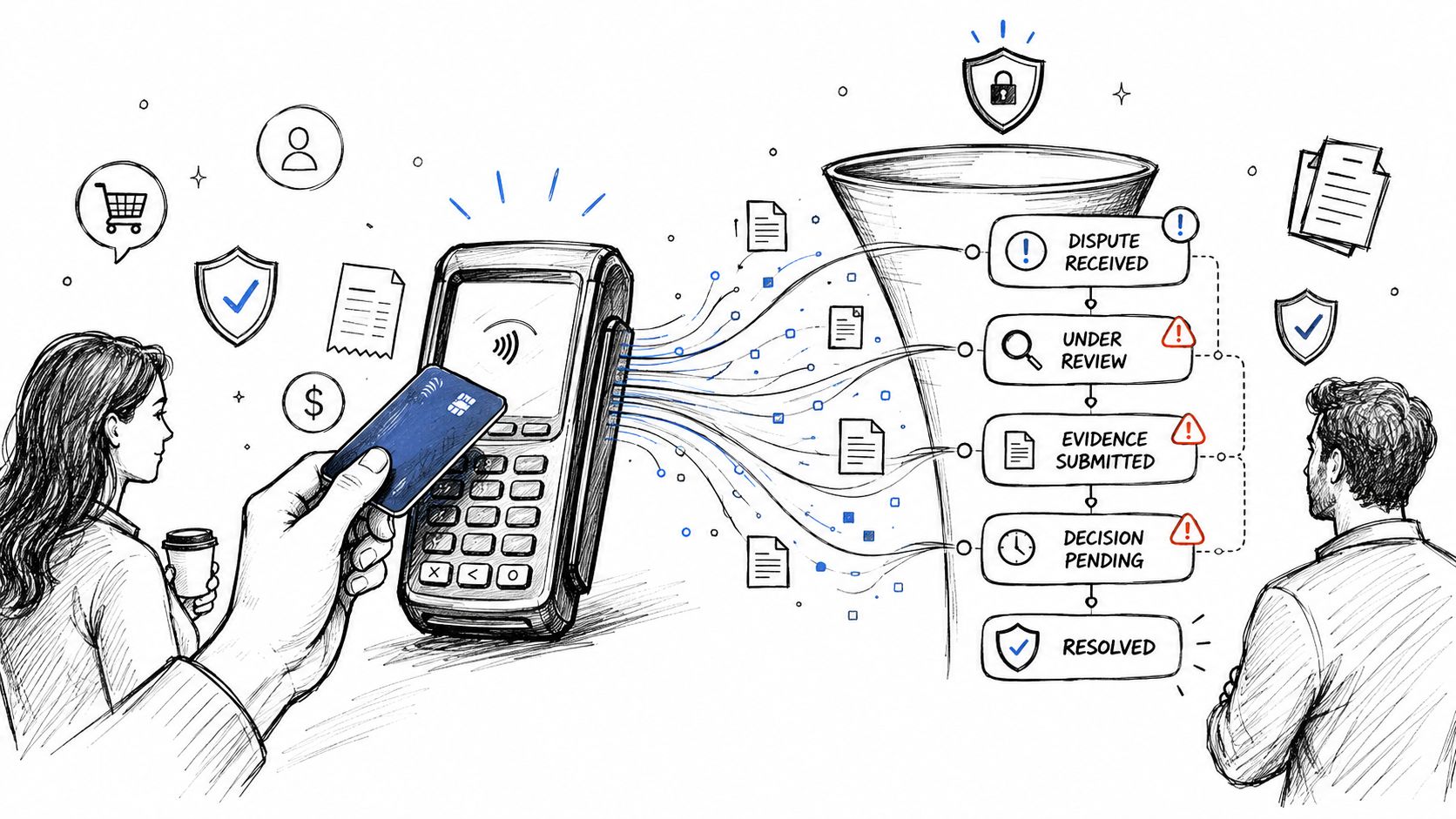
A chargeback rarely starts in the payment terminal, but the terminal's data often decides whether you can defend it. Once a cardholder questions a charge, the issuer, acquirer, and merchant all end up relying on the original transaction trail, especially the card-present indicators, authorization response, and timestamps. If those fields are thin or inconsistent, the merchant has less to work with.
The reason this matters is that dispute handling is often too reactive. Merchants who refund every complaint immediately can erase revenue on cases they might have successfully challenged, while merchants who ignore alerts risk losing the dispute entirely. That's why payment teams look for systems that connect terminal and processor data to a faster dispute workflow, not just to a refund button.
Wind River Payments' 2025 merchant survey found that nearly 30% of merchants reported losing revenue to payment issues in the previous three months, with 19% citing missing preferred payment methods, 15% citing slow checkout or failures, and 25% citing compliance complexity (Wind River Payments survey). That's a good reminder that the acceptance layer and the dispute layer belong to the same operating conversation.
Alert-led workflows versus blind refunding
If you want a plain-English comparison, it looks like this. Blind refunding is fast, but it can reward fraud and drain revenue when the claim was winnable. Alert-led workflows give the merchant a short decision window, so staff can review the transaction, the fulfillment trail, and the customer history before money leaves the account.
For merchants who want a practical primer on winning chargeback disputes, the guidance from LA Law Group, APLC is worth reading because it reinforces how evidence beats guesswork. If you're building your own process, the same logic applies to the transaction log, the delivery record, and the customer communication trail.
When that process needs tooling, a focused overview like Disputely's chargeback-fighting approach helps connect processor signals to the decision point instead of treating every complaint the same way.
Choosing a Terminal Around the Problems You Actually Have
A terminal should be the front door of the payments stack, not just a card reader on the counter. Start with the business problem, then match the hardware to it. If customers cannot pay the way they prefer, conversion falls. If checkout slows down or fails, throughput drops. If compliance work takes too much staff time, operations lose focus. If disputes keep arriving with weak evidence, the merchant pays twice, once in lost sale time and again in avoidable recovery work.
A market estimate from Mordor Intelligence places the global POS terminal market at roughly $123.2 billion in 2025, with Asia-Pacific accounting for 31.3% of revenue, mobile and portable terminals forecast to grow at 9.67% annually through 2031, and contactless systems projected to expand at 9.32% annually (Mordor Intelligence). The practical takeaway is simple, the deployment model now matters as much as the device itself.
Five questions worth asking before you upgrade
- Which payment methods do customers use? If buyers rely on wallets, contactless support matters more than extra software features you may never open.
- Where do approvals fail? If authorization rates are weak, fix the data path before you buy a nicer device.
- How often do outages or device issues cost sales? A terminal that cannot stay online is a revenue leak, not a convenience.
- How does terminal data reach reconciliation? If sales records do not flow cleanly into accounting, staff end up matching receipts by hand.
- Does your processor connect to dispute alert networks? If it doesn't, you're waiting until the chargeback exists. See what a high chargeback rate costs and how to bring it down before you commit to new hardware.
Selection rule: a “smart” terminal is not automatically smarter for your business if extra apps, integrations, and compliance steps add more failure points than they remove.
That is the hidden trap. More capability can mean more maintenance, more training, and more chances for the checkout flow to break. Merchants with tight operations often do better with the few features they will use every day, plus a clean dispute-data path that supports recovery later.
Offline Mode, Outages, and Other Edge Cases to Plan For
Offline mode sounds comforting until you have to reconcile what it approved. A terminal can approve transactions locally within predefined limits, queue them, and submit them after reconnection, but the issuer may later reject the offline approval or identify fraud, which pushes disputed value back to the merchant (North on transaction continuity). That's not a bug, it's the trade-off.
This is why outage planning belongs in the payment runbook, not in someone's memory. Travel, hospitality, events, delivery, and peak retail all need a rule for what to do when the network drops. If staff are improvising, you get inconsistent approvals, weak records, and a messy dispute trail.
A practical outage checklist
- Set offline ceilings by ticket size: smaller, lower-risk sales can be handled differently from large purchases.
- Tighten rules for keyed or delayed entries: manual fallbacks deserve more scrutiny than tap-and-go transactions.
- Reconcile queued payments after reconnection: don't assume every approved offline sale will settle cleanly.
- Keep terminal logs and receipts: if a sale later gets challenged, the paperwork matters.
- Watch delayed approvals separately: an offline approval that lands later shouldn't disappear into ordinary sales reporting.
You can also build a calmer support path by pointing staff to Disputely support when the payment trail needs clarification before anyone reaches for a refund button. That won't fix a bad outage process, but it does keep a confusing transaction from becoming an automatic loss.
The key mistake is treating offline mode as a free backup. It's a risk decision. If you define the ceiling, capture the records, and reconcile aggressively afterward, you keep continuity without giving up control.
If your terminal data, processor trail, and dispute response still live in separate places, it's time to tighten the system. Visit Disputely to see how a dispute-first workflow fits into the payment stack you already run, especially if you want fewer unnecessary refunds and cleaner evidence when a transaction is challenged.


