
How to Process the Transaction Without Losing Margin
Your checkout just flashed Approved, the order landed in Shopify, and the customer already has a confirmation email. On a subscription renewal it looks even cleaner: the card on file went through, the invoice closed, and nobody on your team clicked anything. That green status is the moment most merchant teams stop watching the payment. It is also the moment the expensive work starts.
What It Means to Process the Transaction
A Tuesday order on a Shopify store, or a SaaS renewal that bills overnight, can look finished the second the gateway says yes. The buyer sees a receipt. Your ops channel stays quiet. Finance assumes the money is already yours.
To process the transaction is to move that payment through authentication, authorization, capture, clearing, settlement, and later exception handling. It is not one approve button. Each stage writes its own record, and each record can fail on its own schedule. Declines, duplicates, refunds, and disputes show up after the customer has already left the page.
In person, the card itself does a lot of the proving. The Federal Reserve Payments Study reported that U.S. general-purpose card payments reached 153.3 billion transactions worth $9.76 trillion in 2022. 63.8% of those payments were made in person, and 87.5% of those in-person payments used a chip. The rest includes card-not-present orders, which is where online stores, subscriptions, and digital services live. You can't tap a physical card to show the buyer was there.
Scale is why a small miss hurts. The same Federal Reserve figures show cross-border payments on U.S.-issued cards rose from 1.4 billion transactions and $140 billion in 2018 to 7.5 billion transactions and $470 billion in 2022. A sloppy descriptor or a late refund is no longer a one-off ticket. It is a pattern across a huge book of payments.
Creators and small product teams often meet this machinery for the first time when creators can access Stripe payments and discover that checkout is only the front door. What follows is a path through the stages, the breaks after approval, and the choice of which alerts to refund and which to keep.
How Authorization Capture and Settlement Differ
Think of the card path as a relay, not a single switch.
- The acceptance point starts it. Your checkout, terminal, or billing job sends a payment request with amount, currency, and card or token data.
- The acquirer or processor takes the baton. It checks the message and routes it onward. This is the partner behind Stripe, Shopify Payments, PayPal, Authorize.net, or a direct acquiring bank.
- The card network passes the request. Visa or Mastercard carries it to the bank that issued the card.
- The issuer decides. Approve or decline comes back down the same chain, often in a second or two.
That return message is authorization. It means the issuer is willing to let the charge proceed and has typically reserved the amount. It does not mean the funds are in your account.
Capture is your later request to take some or all of that reserved amount. You might capture at shipment, at the end of a trial, or immediately at checkout. A capture can be less than the authorized total. It should not become a different total with no note in the order.
Clearing and settlement come after that. The processor, acquirer, network, and issuer reconcile the records and move the money. The U.S. Treasury's card-acquiring documentation treats authorization and clearing/settlement as the two primary stages, and it reports next-day fund availability for its own operations. The auth response felt instant. The cash did not.
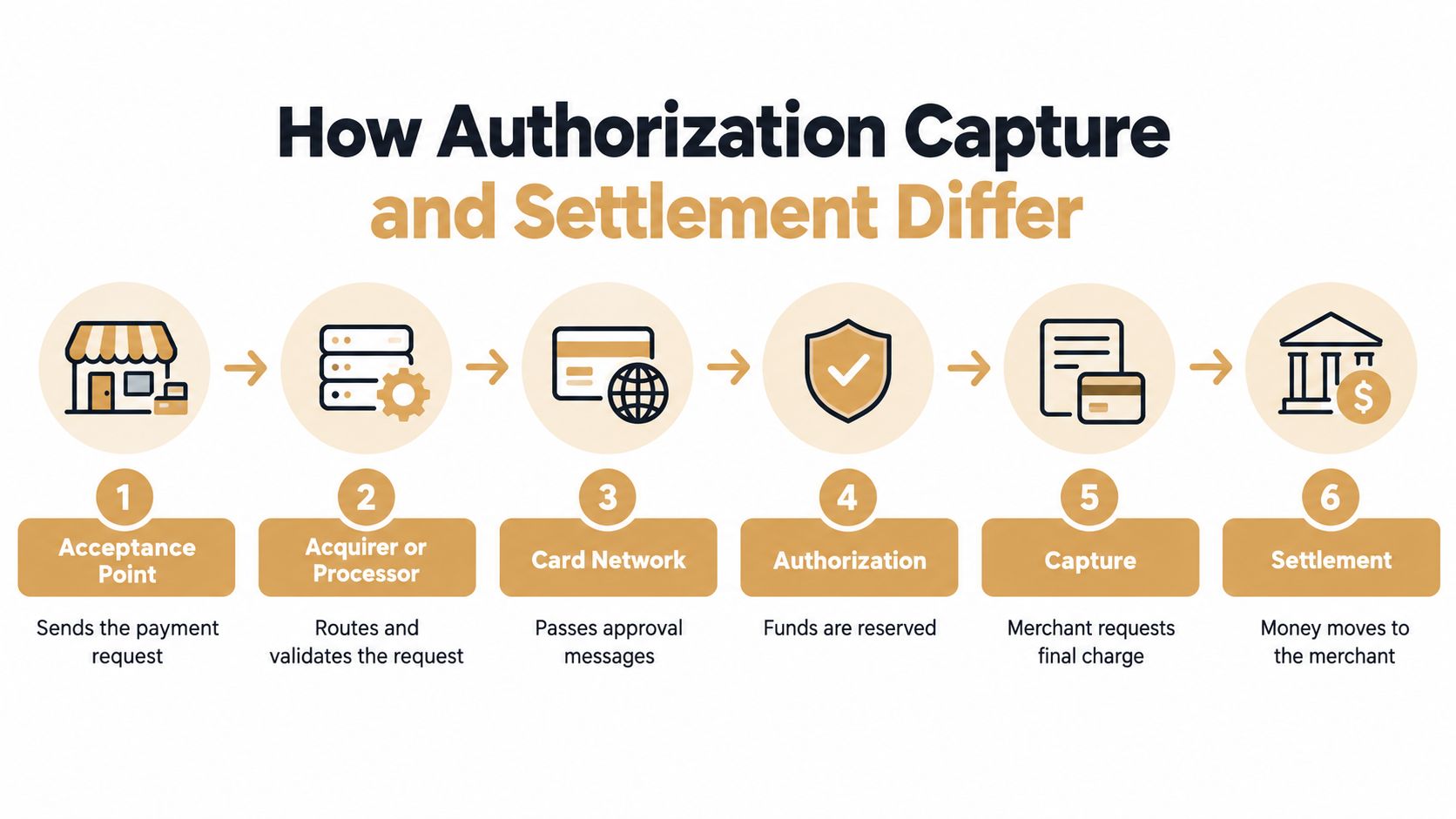
Approved and settled are different states. A green checkout can still be an open receivable.
This split is old infrastructure, not a modern quirk. In 1973 Visa launched BASE I so approvals could move electronically among merchants, acquirers, and issuers, and two years later BASE II handled electronic clearing and settlement, as described in Visa's network technology overview. The jobs stayed separate on purpose.
Fields worth keeping apart
Store these as separate columns, not as one "paid" flag:
- Response code: The issuer's approve or decline, plus any soft-decline detail.
- Transaction identifier: The network or processor reference you will need for a refund or a dispute file.
- Timestamp: When auth happened, not when the order page loaded.
- Currency and amount: Auth amount and captured amount, side by side.
- Settlement status: Pending, settled, returned, or exception.
Gyms and studios hit the same gap when a membership looks billed but the deposit has not landed. Teams that save time with automated gym billing still need that export, because automation does not merge auth and settlement into one fact.
Tomorrow, open one processor export and filter for approvals that are not yet settled. If those rows share a single status field, your books are guessing.
Failure Points After a Payment Is Approved
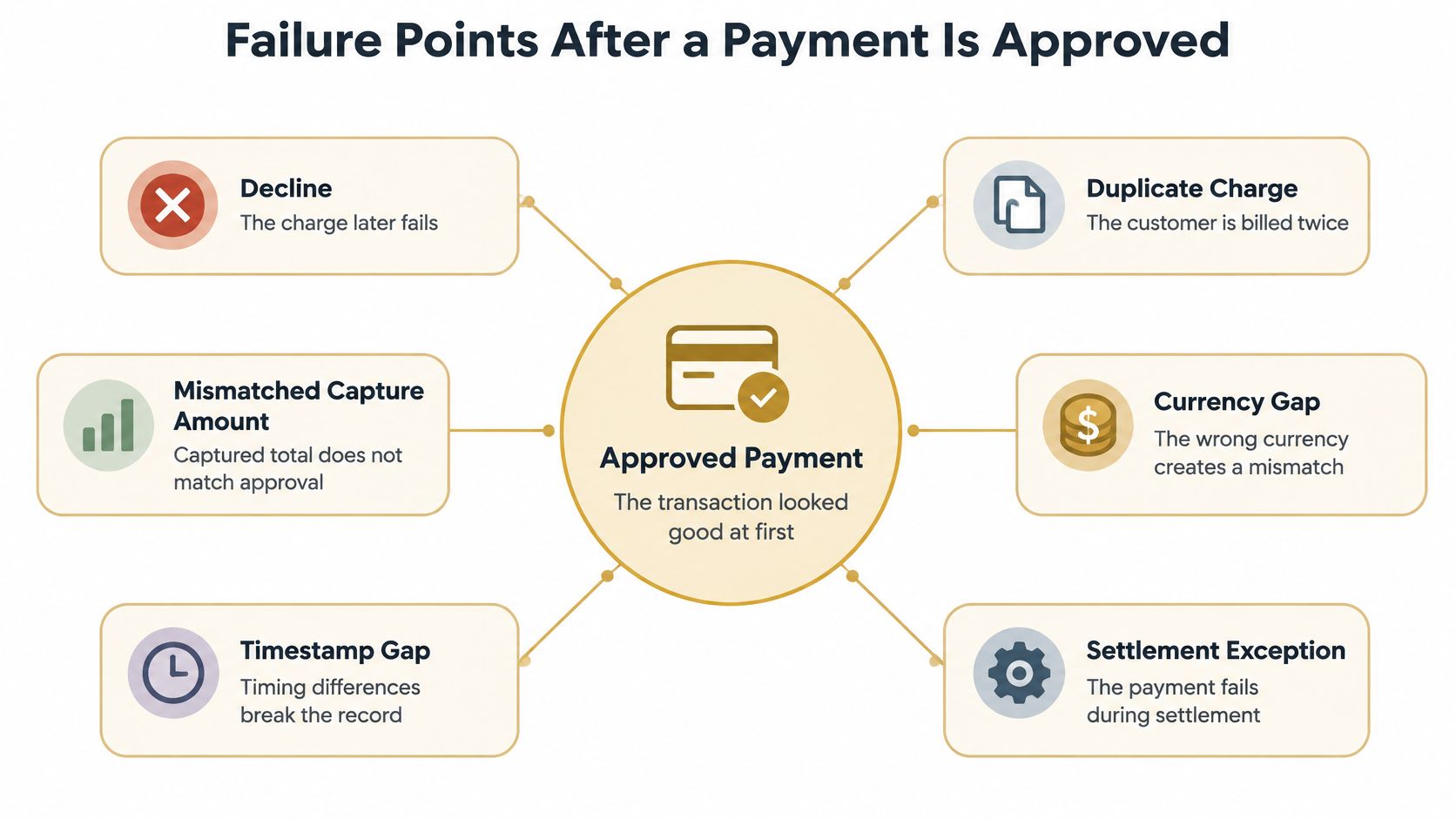
An approval can still break at a specific handoff. Calling it a "processing error" hides which person or system dropped the record.
A later decline shows up when a second message fails. The first auth passed, then capture was rejected, the issuer reversed the hold, or a recurring attempt hit a closed card. The order page still says paid.
A duplicate charge usually means the request was sent twice. A shopper double-clicked, a webhook retried, or a subscription job and a manual invoice both captured the same auth. Both can settle.
A mismatched capture amount happens when tax, shipping, or a partial shipment changes the total after the issuer reserved a different figure. Finance sees one number. The customer sees another.
Currency and timestamp gaps are quieter. A USD auth recorded as EUR, or a timestamp in store time next to a processor timestamp in UTC, makes the same payment look like two events. Reconciliation jobs then create a second refund or miss the first one.
A settlement exception is the payment that was approved, captured, and then kicked back during clearing. The customer was charged in their banking app for a day, your payout file skipped the row, and support has nothing solid to quote.
Tokens do not skip the issuer
EMV payment tokenization changes the credential, not the decision path. Instead of sending and storing the primary account number (PAN), you or your provider send a payment token. EMVCo's tokenisation guide describes the merchant sending a token payment request with the token and the transaction data, then receiving a response after the issuer authorizes the underlying account. The request still goes to the acquirer and across the network.
A token can be limited by merchant, device, transaction type, or channel. A stolen token is less useful outside that scope. It is not a promise that the next charge will be approved.
For card-on-file and recurring billing, keep the token and the network transaction reference, and track token lifecycle separately from authorization state. A live token plus a failed issuer check is a decline, not a settled renewal.
What to line up in the export
Pull a week from Stripe, PayPal, Shopify Payments, or Authorize.net and check that you can see:
- Token or PAN indicator, so you know you are not storing raw card numbers.
- Auth state and token state as two columns.
- Capture amount versus auth amount.
- Duplicate identifiers on the same order.
- Settlement result, including returns.
Left unmatched, those gaps feed dispute volume. A climbing ratio is how processors start watching a high chargeback rate long before your support team agrees there is a fraud problem.
Real Checkout and Refund Scenarios
Mechanics don't tell you which order will become a dispute. These three do.
A vague descriptor on a card-not-present order. Maya buys a $64 skincare kit. Checkout uses a legal entity name she has never seen. Three days later her bank app shows NXR COMMERCE 8841. She doesn't recognize it, so she disputes the charge. The package is already in transit. You had a good auth, a clean capture, and a descriptor that only your accountant would recognize.
A renewal after a cancellation the buyer thought was done. Jordan cancels a software plan on Sunday night. The billing job runs Monday morning because the cancellation flag had not synced. The token is valid, the issuer approves, and Jordan gets a receipt for a product they believe they already ended. That is not a stolen card. It is a lifecycle miss.
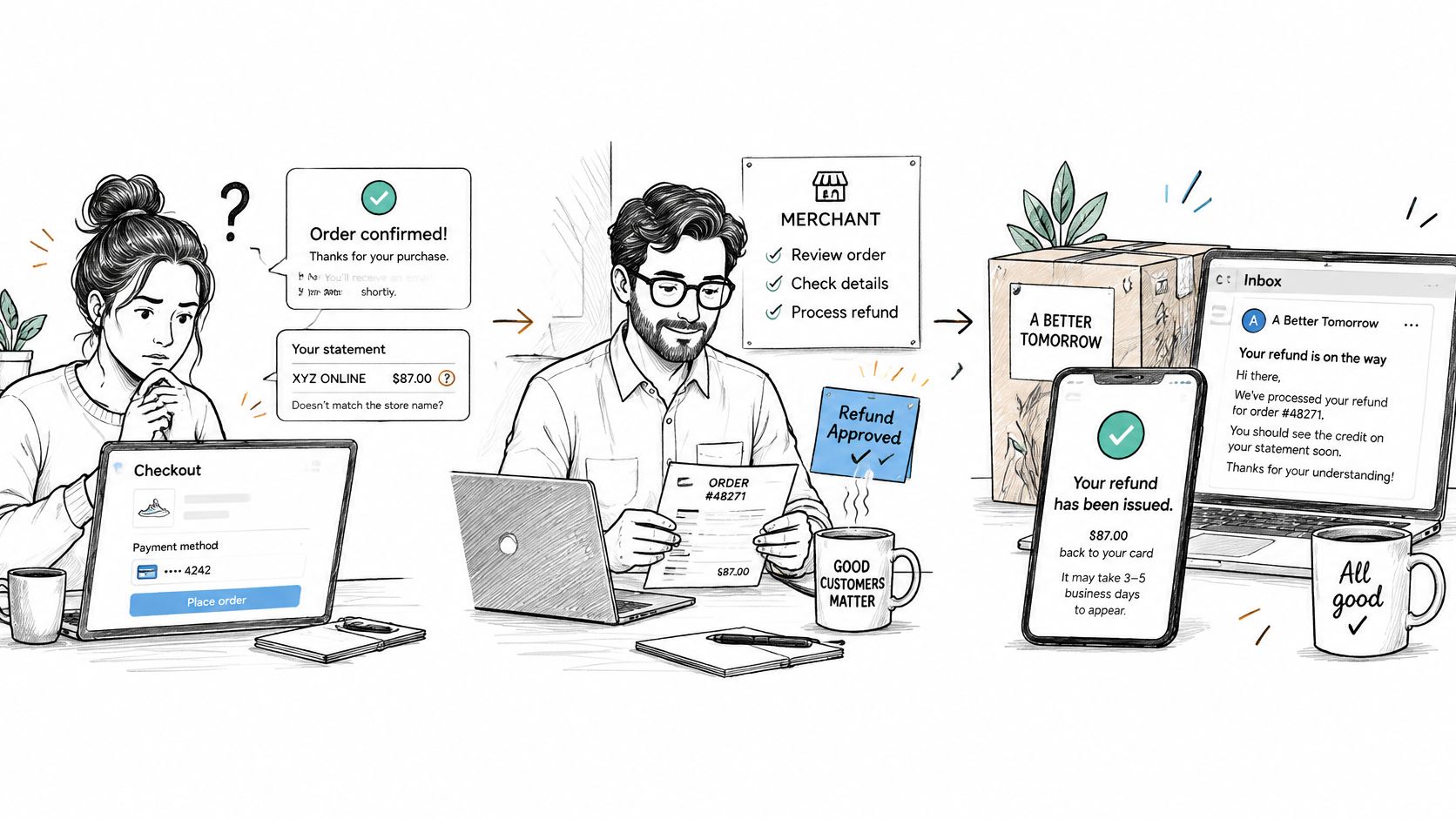
A late delivery with a refund that still looks open. Sam's order arrives six days late. Your team approves the refund in the store admin on Friday. The processor refund stays pending through the weekend. Sam's statement still shows the charge on Monday, so Sam files a dispute for a refund you already agreed to give.
The question processing guides skip is simple. If the customer was entitled to the money back, why did the charge become a dispute? Because the post-purchase record never caught up with the buyer's screen.
Global merchant research covering 1,082 professionals across more than 35 countries found that 57% reported increasing refund or policy abuse, 62% reported an increase in first-party misuse disputes, and 47% identified refund abuse as the leading fraud attack. Separate dispute reporting also shows shoppers citing delayed refunds and missing or late deliveries, alongside unauthorized purchases. Both things are true at once. Some buyers are abusing policy. Some are reacting to a refund you were slow to finish.
Controls that belong after checkout
- Refund SLAs: Write the hours from "we owe this" to "the processor shows refunded," and staff the weekend.
- Confirmation and tracking: Send the message when the state changes, not only when a human clicks refund.
- Recognizable descriptors: Use a name the buyer typed into search, plus a phone or URL that reaches a person.
- State reconciliation: Match the processor refund status to the order record every day. Pending is not done.
Faster refunds cut some disputes and invite others if anyone who asks gets paid.
A real service failure is a late box, a double bill, or a cancellation you failed to honor. First-party abuse is a delivered order the buyer still disputes, or a used subscription month they want free. Label the case before you pick a money response.
When to Refund an Alert Instead of Fighting
A chargeback alert arrives for a delivered order. The tracking shows delivery, the buyer has used the subscription, and the amount is large enough to matter. Refunding may close the alert quickly, but it also gives up revenue you may have been able to keep. Treat each alert as a decision about evidence, cost, and dispute exposure, not an automatic refund.
Compare four factors:
- Customer value: Consider whether the buyer may return, including future subscription payments.
- Evidence strength: Check delivery, usage, billing details, and prior renewals. These records help you judge whether you could defend the charge.
- Cost of handling the case: Include the refund amount, any dispute or representment fees, and staff time.
- Dispute-ratio exposure: Consider how this case affects your dispute rate alongside other cases. A refund can reduce a chargeback, but refunding every alert can drain margin.
A blanket refund policy can make the ratio look healthier while paying back customers who received what they bought. The opposite policy, fighting every alert, can waste staff time and lose disputes with weak evidence. The right response depends on the case.
Sort the alert before you move money
Review the amount, order history, fulfillment status, subscription tenure, and available evidence. A low-value first order with no delivery scan presents a different decision from a long-term subscriber who logged in after renewal.
| Situation | Better response | Why it protects margin |
|---|---|---|
| Low amount, no delivery scan, little order history | Refund the alert | The cost of preparing a defense may exceed the order value, and a loss still counts as a dispute |
| Unclear billing name, buyer contacted you first | Refund and correct the descriptor | Weak recognition evidence can make a defense difficult, while a clearer descriptor may prevent future confusion |
| Delivered order, established subscription, usage logs | Keep the alert and prepare evidence | Refunding gives up revenue for a service the customer used; records may support a defense |
| Duplicate capture visible in your payment records | Refund only the extra capture | You correct the duplicate without returning payment for the valid charge |
| High-value order, signed delivery, prior successful renewals | Assess the evidence and deadline before deciding | Strong records may justify defending the charge instead of issuing an unnecessary refund |
For a low-value order with weak evidence, a refund may cost less than preparing a defense. For a delivered order with clear usage records, refunding may sacrifice revenue without reducing the underlying risk enough to justify it. Set a written decision rule, then make sure the team applies it consistently.
How to Choose a Chargeback Alert Approach
Once you know which alerts deserve a refund, the remaining problem is time. Someone has to see the dispute before it is filed, apply the rule, and refund only when the rule says so.
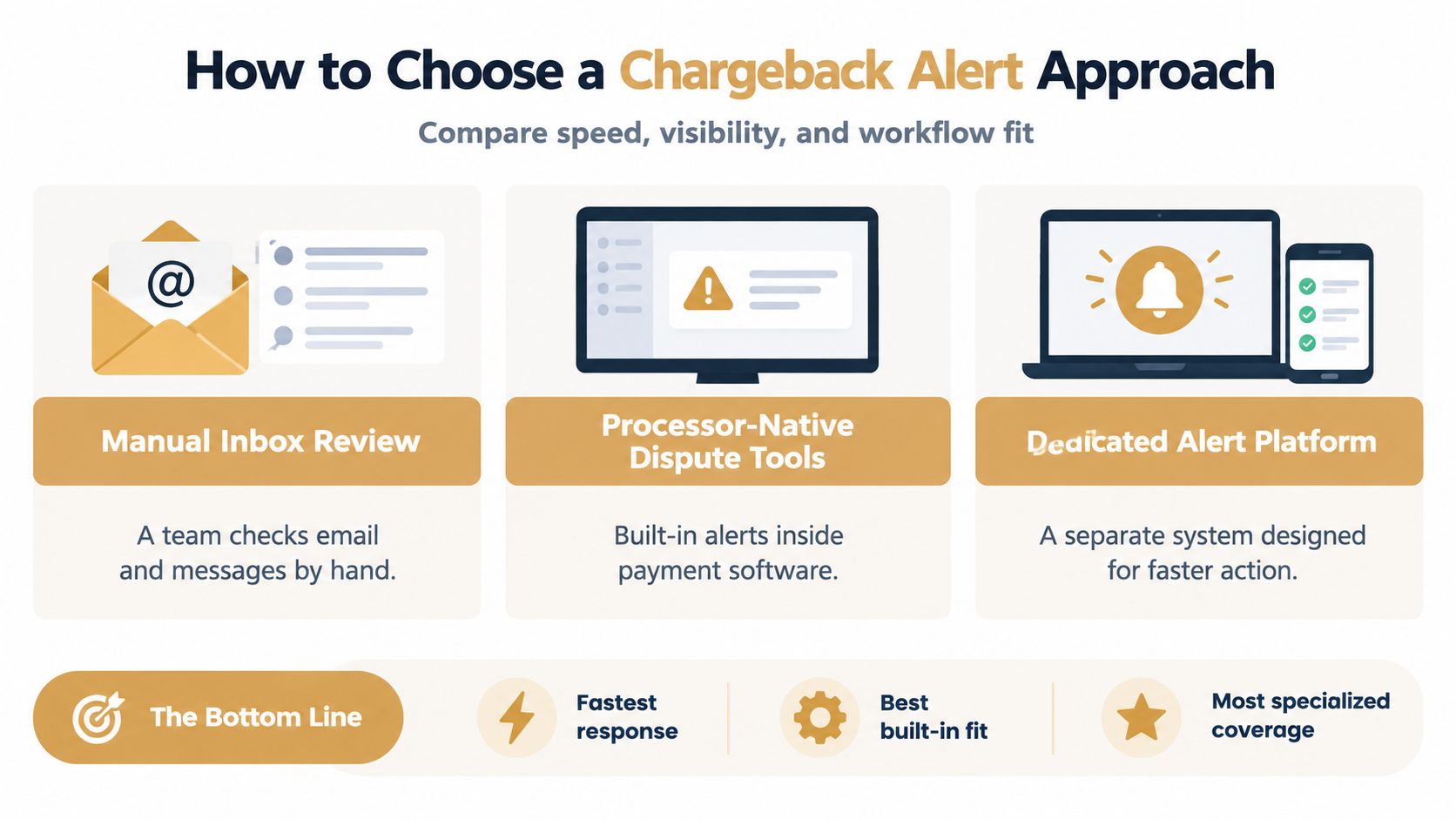
Manual inbox review is a person checking email, Slack, and the processor dashboard. It fits a low-volume store where one owner still recognizes every order. It fails when alerts arrive overnight, or when two people refund the same case because neither saw the other's note. Evidence quality depends on whoever is awake.
Processor-native dispute tools live inside Stripe, PayPal, Shopify Payments, Authorize.net, or Square. They are the best built-in fit when you already work in that dashboard and your volume is moderate. You see the charge next to the payout. You often still decide one by one, and you may not hear about a Visa and a Mastercard alert in the same queue. Rules tend to be "refund everything" or "refund nothing."
A dedicated alert platform sits beside the processor. The job is earlier notice, one queue, and a filter that can refuse the refund when your evidence is strong. That is the specialized coverage high-volume ecommerce, subscriptions, and categories such as supplements or travel usually need, including stores on Shopify, WooCommerce, and custom carts.
Disputely is one of those platforms. It connects to Visa Rapid Dispute Resolution, Mastercard CDRN, and Ethoca, so you hear about a disputed charge and typically have 24 to 72 hours to refund before a chargeback is filed. Stripe, PayPal, Shopify Payments, Authorize.net, and Square can be connected in under five minutes. Refund rules can run on their own, with filtering meant to avoid refunding disputes you would likely win. Pricing is pay-per-alert, with no setup fees or contracts. Monitoring is 24/7 with 99.9% uptime, plus dispute analytics. The company says customers report chargeback reduction of up to 99%, which is also how some merchants stay out of network monitoring programs, reserves, and account holds.
If you are still assembling evidence packets by hand, start with the mechanics of chargeback fighting so the "keep" cases are winnable. A low-volume shop can stay on inbox review. A subscription book or a store past several thousand orders a month usually needs the earlier queue, or the ratio moves before anyone reads the email.
Protect Margin After You Process the Transaction
Pull one week of orders that were approved and not settled, orders you refunded, and orders that became disputes. Mark each failure as a descriptor problem, a late refund, a duplicate, or weak evidence. You are looking for the pattern, not a perfect archive.
Then write one rule and pin it where billing and support both see it.
- Refund the alert when fulfillment failed or the descriptor was unclear and you don't have delivery, usage, or a clean cancellation record.
- Hold the alert when delivery, product usage, or subscription tenure supports the charge.
Run that rule on the next alerts before the response window closes. High-volume and subscription teams should connect the processor they already use and test the rule on live alerts rather than on a spreadsheet from last quarter. A pay-per-alert calculator is the right check before you commit, because the savings have to beat both the refunds you still choose and the disputes you no longer file.
Shopify teams can start by reviewing Shopify chargeback protection against the week's tagged orders, then apply the same rule to WooCommerce or a custom cart if that is where the renewals run.
Processing is finished only when those exceptions are handled selectively. The dispute ratio and the contribution margin are the same decision, counted twice.
Disputely notifies you through Visa, Mastercard, and Ethoca alerts so you can refund only the cases your rule selects and stop the rest from becoming chargebacks. If approved payments are leaking margin through blanket refunds, connect your processor and see the pay-per-alert math before the next alert expires. Visit Disputely to set that rule on the transactions you already process.


