
What Is Merchant Processing? a Simple Guide
Last month's processing statement arrives and the total refuses to match the rate you were quoted. A percentage sits beside a fixed charge on each transaction, a monthly minimum, and one dispute nobody remembers approving.
Merchant processing is the set of checks and handoffs that turns a customer's card or wallet tap into money in your bank account. The scale is enormous, so the system prices caution as well as convenience. Each fee line is someone charging for a risk: the chance a payment is fake, the chance a customer complains, the chance cash arrives late. A reserve, meaning a slice of takings held back as a safety buffer, can keep real revenue lower than the terminal total. So can the hours spent answering a dispute.
A card payment works like a relay: the baton is information, and cash is the last leg. Reading the statement means spotting who controls each leg and which cost each one can add.
What Merchant Processing Means in Plain English
Say a customer taps a card at your counter, or types one into checkout. That payment isn't one company's job. It passes through you, an acquiring bank or payment processor, the card network, and the customer's issuing bank. Each stop reads the details and stamps them, the way a sorting office handles a letter, before money reaches your account.
The Federal Reserve Payments Study reported that U.S. general-purpose card payments reached 153.3 billion transactions in 2022, with a total value of $9.76 trillion. Transaction count increased 6.0% from 2021 to 2022, while transaction value increased 10.5%.
Card-not-present payments use that same network. Ecommerce, subscription, and app checkouts send credentials and transaction data digitally. Nothing is read at a physical terminal. That's why processing matters to an online business as much as to a shop.
Three stages sit under every payment. Authorization is the issuer's approve or decline. Clearing is the exchange of final details. Settlement is the transfer of funds to the merchant's acquirer. Knowing the parties, the path from a yes to cash, and how disputes change what you keep is the whole point of reading the statement.
Who Does What Between Checkout and Your Bank
Picture a restaurant. The diner orders and pays. A waiter carries the order. The kitchen cooks it. The house rules say what can be served. A bank settles the bill at the end of the night. A card payment has the same cast, and one company often plays more than one part.
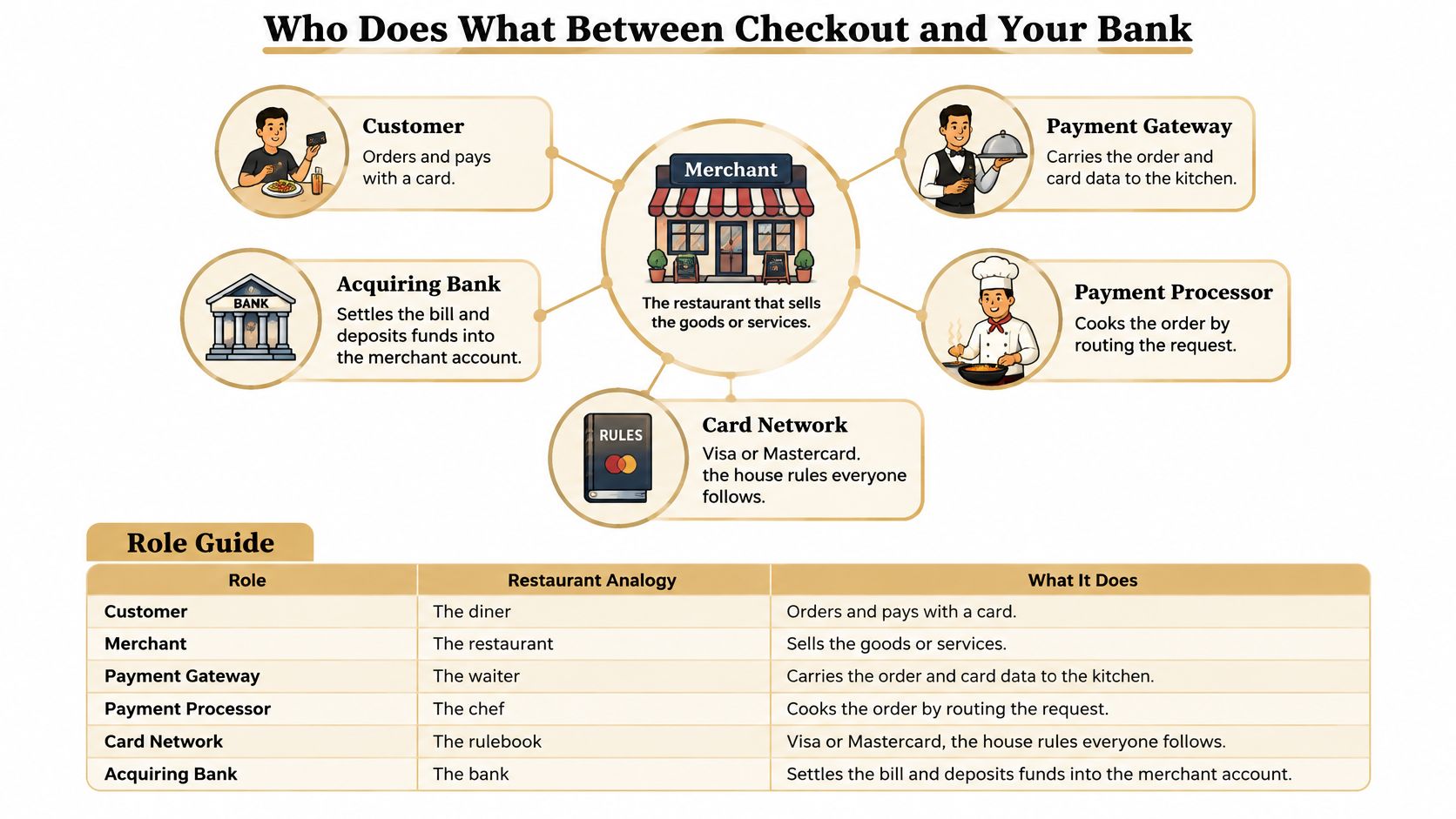
You rarely see every name on the statement. You do need to know who owns each problem. A declined card is an issuer decision. A missing payout is an acquirer or processor question. A checkout error is usually the gateway.
Where the roles overlap
The payment gateway captures card details and encrypts them, often through a plug-in such as Shopify, WooCommerce, or Authorize.net. The payment processor routes the request and reports the result. Stripe, Square, and PayPal commonly bundle gateway and processing, so one login covers both. The acquiring bank holds the merchant account and receives funds for you. Visa, Mastercard, and American Express are the networks that set rules and carry messages. The issuing bank owns the cardholder's account and says yes or no.
Gateways often replace the card's primary account number, the PAN, with a payment token. PCI Security Standards Council guidance describes payment tokens as substitutes that, paired with a dynamic cryptogram or domain controls, help prevent unauthorized use. That doesn't erase your duties. PCI DSS still applies wherever account data is stored, processed, or transmitted, and the token service provider plus any system that keeps the PAN stays in scope.
Ask your gateway which model you have. Network tokens, gateway vault tokens, and encrypted PAN storage don't travel the same way, and they don't move with you if you switch processors. Keep the token reference, the authentication result, and the processor response code with each order. You'll need them when a payout doesn't match or a dispute arrives.
| Party | What It Does | Typical Example |
|---|---|---|
| Merchant | Sells the product and requests payment | Your online store or the cafe at the corner |
| Payment gateway | Captures card data at checkout, encrypts it, and passes it on | Authorize.net, Shopify Payments checkout |
| Payment processor | Routes the transaction and reports the result | Stripe, Square, PayPal |
| Acquiring bank | Holds the merchant account and receives funds for the merchant | The bank partnered with the processor |
| Card network | Sets rules and carries messages between acquirer and issuer | Visa, Mastercard, American Express |
| Issuing bank | Owns the cardholder's account and approves or declines | The customer's own bank or card company |
Write the party names from your own statement next to this table. When a line looks wrong, you'll know the first call to make.
How One Payment Moves Through Authorization, Clearing and Settlement
An approval on screen is permission, not cash. The U.S. Treasury's card-acquiring process separates the stages, and your books should too.
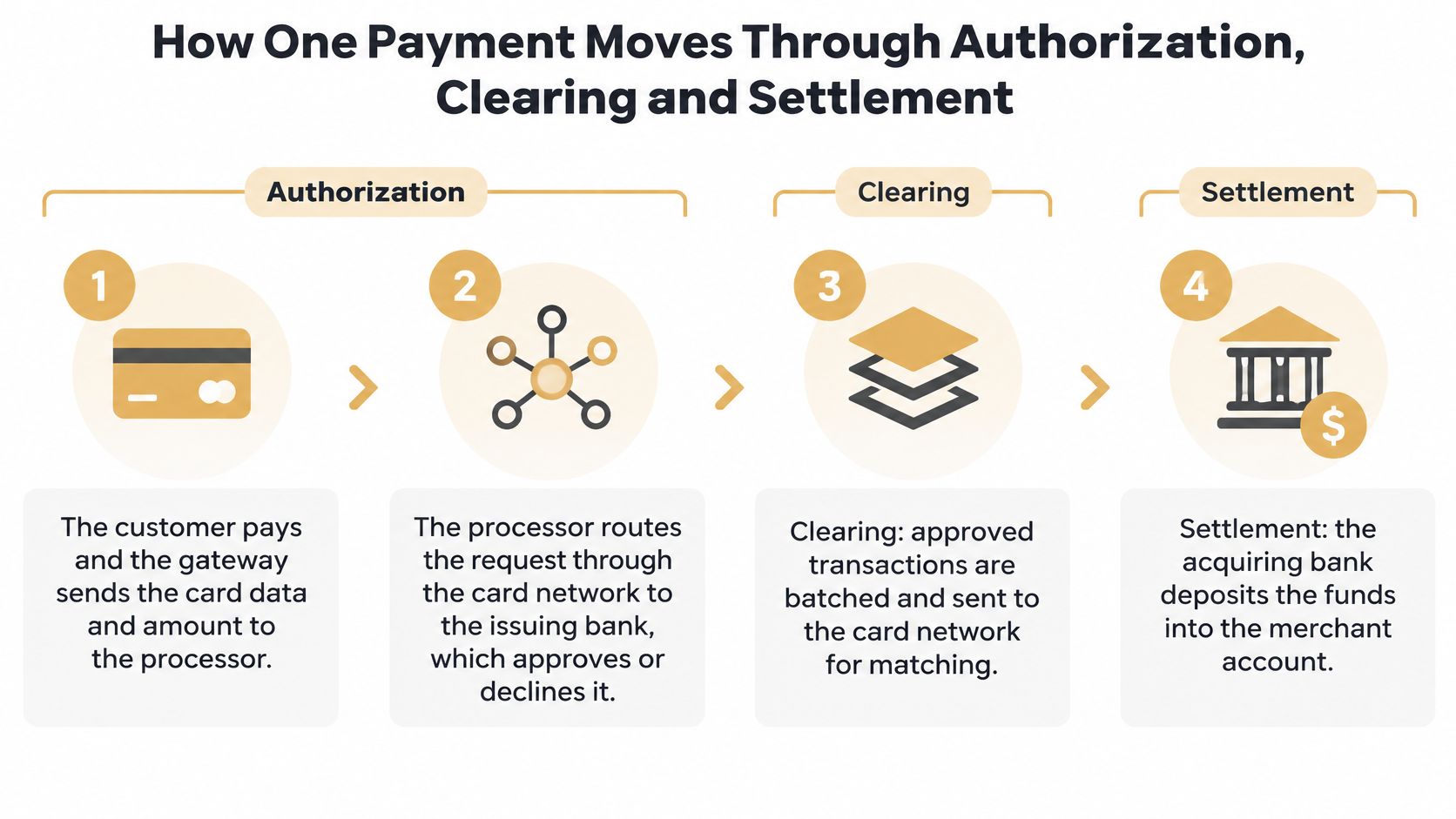
- The customer pays. The gateway sends the card data and the amount to the acquiring processor. Without this handoff, nothing else starts.
- The processor routes the request. It travels through the card network to the issuer, because only the issuer can see the account.
- The issuer decides. It checks account status, available credit or funds, fraud signals, and card controls, then returns approve or decline. That answer is authorization. It reserves the right to proceed. It doesn't move final funds.
- Clearing reconciles the record. You submit the final amount, often when the goods ship or the renewal posts. Merchant, acquirer, network, and issuer match the details.
- Settlement moves the money. Funds shift from the issuing side to the acquirer, then into the merchant account on the funding schedule in your agreement.
A hotel puts a hold on a card at check-in. That's authorization. The final bill, charged after checkout for the actual total, is closer to capture and settlement. The hold can expire, the final amount can differ, and a later dispute can pull the money back.
The Treasury process describes next-day fund availability for accepted transactions. Commercial payouts slip for ordinary reasons: weekends, a risk profile that triggers a reserve, the funding arrangement, and how your processor batches. Forecast cash from the deposit date, not from the approval timestamp.
An approved authorization can still fail through a capture error, an expiration, a duplicate, a refund that doesn't match, or a dispute. Treat authorization, capture, settlement, refund, and dispute as separate events. "Approved" is not "paid."
| State | What It Means | What to Check |
|---|---|---|
| Authorized | Issuer approved and reserved the funds; nothing has moved | Approved amount matches the order total |
| Captured | Merchant asked for the approved amount to be collected | Captured amount matches what shipped |
| Settled | Funds moved from the acquirer to the merchant account | Payout amount and date match the expected schedule |
| Refunded | Money returned to the cardholder | Refund is linked to the original transaction |
| Disputed | Cardholder has challenged the charge with the issuer | Dispute deadline and evidence requirements noted |
Card batches aren't the only way funds finish their trip. Teams comparing payout speed sometimes look at exploring stablecoin settlement options as a different rail for the last step, while card authorization still runs through the networks above.
A short walk-through of the same path helps if the statement lines still feel abstract.
Fees and Terms on Your Processing Statement
Say a flat-rate provider charges 2.9% plus $0.30 on a $100 card sale. The fee is $3.20, so $96.80 is left before refunds, shipping, or a dispute. That single number hides three layers.
Interchange goes to the issuing bank under network schedules, and it's usually the largest slice. Network assessments are the smaller charges Visa, Mastercard, and others set by rule. Processor markup, plus any gateway fee, is what your provider keeps. Markup is the layer you can negotiate. Interchange and assessments are not.
Two ways the same sale is priced
Flat-rate pricing bundles interchange, assessments, and markup into one number, like the $3.20 above. It's simple to read and hard to audit, because a premium rewards card and a debit card look the same on the bill.
Interchange-plus prints the layers apart. On that same $100 sale you might see about $2.20 of interchange, about $0.16 of assessments, and a separate markup line. Those splits are an illustration of the statement layout, not a promise of your rate. The value is visibility. You can see whether a higher bill came from card mix or from the provider's cut.
Lines that surprise people
Monthly minimums bill you even in a quiet month. Gateway and PCI compliance fees show up as monthly or per-transaction charges on top of the rate. A chargeback fee posts when a dispute is filed, including disputes you later win. Early termination fees apply if you leave before the contract ends. A rolling reserve holds a share of sales for months because the processor is pricing your risk, not just your volume.
Practical rule: Match every statement line to the table before you decide a rate is high or low. A cheap headline with a reserve and a chargeback fee can cost more than a higher rate with clean funding.
| Fee or Term | Who Sets It | What to Check |
|---|---|---|
| Interchange | Card issuer, following network schedules | Largest line; check card type and channel |
| Network assessments | Visa, Mastercard, others | Small, fixed by network rules |
| Processor markup | Processor | The part you can negotiate |
| Flat-rate fee | Processor | Bundles interchange and markup together |
| Gateway fee | Gateway provider | Look for per-transaction and monthly charges |
| Chargeback fee | Processor | Charged even if you win the dispute |
| Rolling reserve | Processor, based on risk | Ties up cash; get the release terms in writing |
Why a Chargeback Costs More Than the Sale
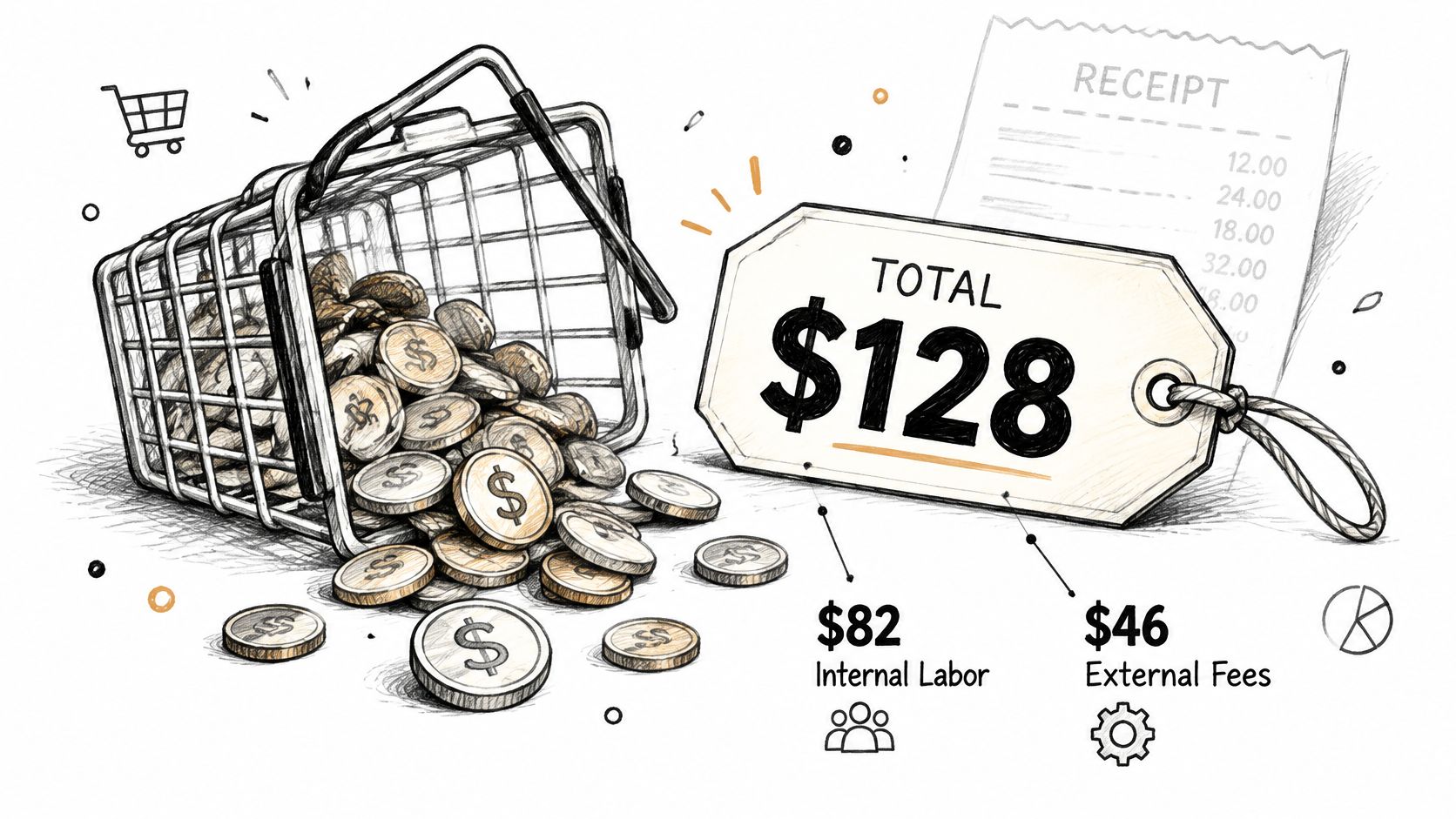
Say a subscription renews at $40 and the margin is thin. One dispute can wipe out that sale and several like it. In 2025, a chargeback cost merchants an average of $128 in third-party fees and internal costs, including approximately $82 in internal labor and $46 in external fees, and those figures exclude lost merchandise, fulfillment, and revenue, according to Mastercard's 2025 chargeback cost briefing. Subscription chargebacks averaged $69 in transaction value, so the handling cost can exceed the profit on the original sale. Dispute volume is projected to reach 324 million transactions by 2028, up 24% from 2025.
The cost that isn't on the rate card
Effective processing cost is wider than basis points:
Payment fees plus fraud tools plus dispute labor plus refunds plus lost goods plus cash tied up in reserves or holds.
A low headline rate gets expensive for subscription, SaaS, travel, or higher-risk merchants when the dispute workflow creates labor, refunds, reserves, or account restrictions. If your ratio is already climbing, the steps in a high chargeback rate review belong next to the fee schedule, not after it.
A cheaper rate that loses
Take 1,000 orders at $100, so $100,000 in sales, as a monthly sketch. A processor that is 0.7 points cheaper saves $700. If 1% of those orders become chargebacks, that's 10 disputes. At $128 each, handling is $1,280, and that already outweighs the rate cut, before lost goods.
Cutting the advertised rate doesn't automatically improve the margin. Stopping avoidable disputes, and closing the ones you do get faster, often saves more. Each month, put dispute count and hours spent next to the fee total. That pair tells you whether the processor is cheap.
Which Disputes Are Fraud and Which Are Confusion
A dispute isn't automatically stolen-card fraud. Approximately 45% of chargebacks are associated with fraud, split between third-party and first-party fraud, and 76% of surveyed U.S. and U.K. cardholders preferred resolving disputes through their bank, according to a Datos Insights chargeback summary. Nearly half reported bypassing the merchant entirely. Average chargeback rates increased from 0.17% in Q1 2025 to 0.26% in Q3 2025, a 53% increase.
The rest of the pile is confusion, dissatisfaction, a forgotten renewal, a late delivery, or a refund that was hard to find. Tight fraud rules at checkout will reject good customers and won't fix those cases. You often hear about the problem only after the issuer has already opened a case.
What to do before anyone calls the bank
Make the billing descriptor match the name customers expect on a statement. Send delivery and renewal notices before the charge feels like a surprise. Put a refund and cancellation path where a person can find it without a ticket. Tag recurring-billing complaints so you can see a pattern. When a dispute does arrive, answer with transaction-level evidence, not a generic screenshot. Fighting well is its own workflow, and a practical chargeback fighting process starts with the reason code, not with a blanket refund.
Aggressive screening saves you from stolen cards. It doesn't save you from a customer who doesn't recognize your name on the statement.
| Dispute Type | Typical Trigger | Best First Response |
|---|---|---|
| Third-party fraud | A stranger used a stolen card or credentials | Fraud screening, and a prompt refund if the order can't be verified |
| First-party misuse | The cardholder bought the item and disputed it anyway | Delivery records, login or IP data, and clear order terms as evidence |
| Subscription confusion | A renewal the customer forgot or didn't expect | Renewal reminder history and an easy cancellation path |
| Delivery dispute | Item not received or arrived late | Tracking proof of delivery, or a refund when proof is missing |
| Processing error | Charged twice, or charged for a cancelled order | Refund the duplicate and document the error |
Match the response to the trigger. A stolen-card case and a forgotten renewal don't deserve the same playbook, and treating them alike is how good orders get blocked while bad disputes still post.
Alerts Stop Disputes Early and Your Setup Checklist
The cardholder calls their bank and files a dispute. That's the first moment you can still change the outcome, if you hear about it before a formal chargeback posts.
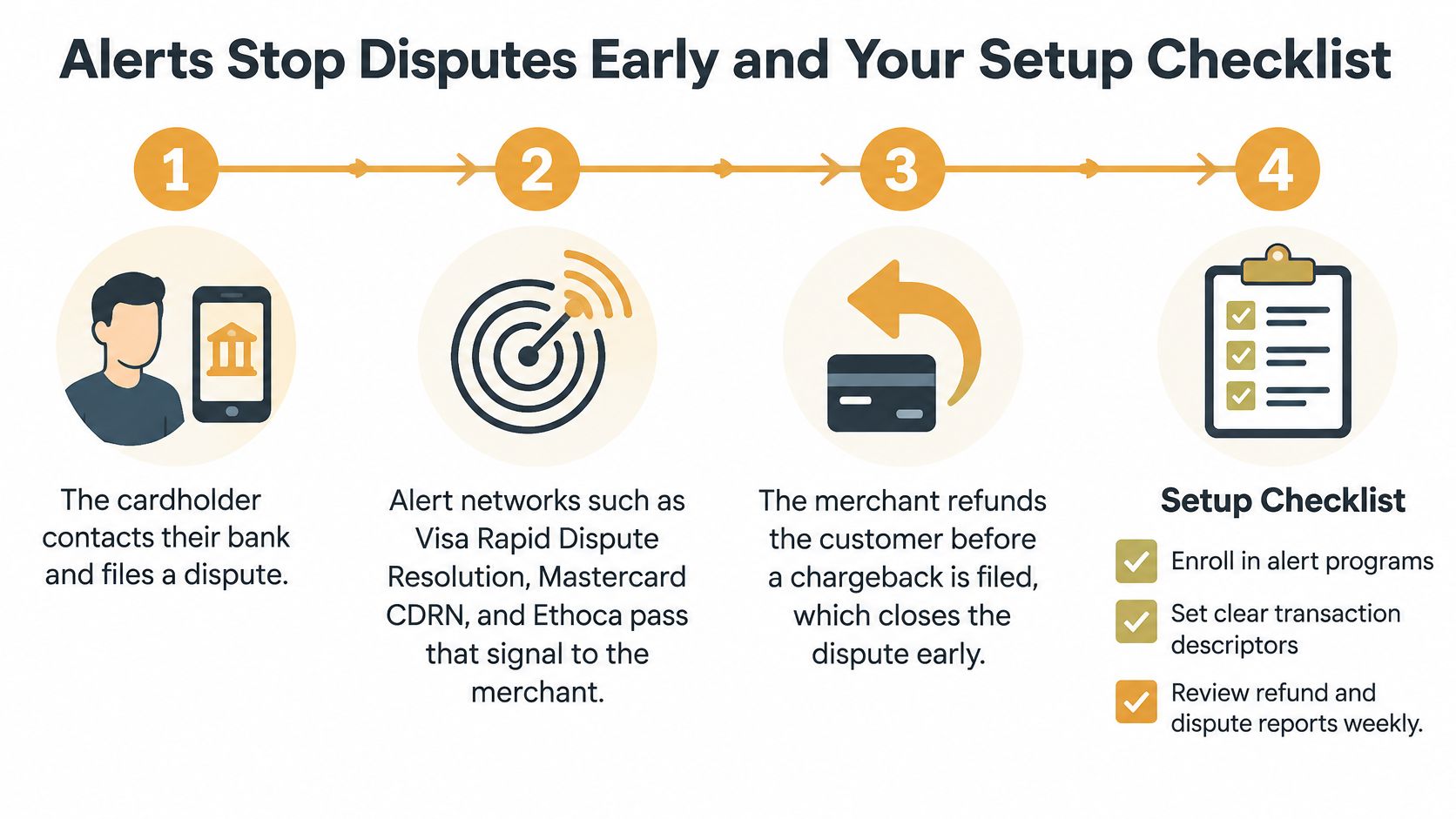
The window before a chargeback posts
Alert networks pass the cardholder's complaint to you early. Visa's Rapid Dispute Resolution, Mastercard's CDRN, and Ethoca are the common paths. Our alerts connect to Visa, Mastercard, American Express, and other card networks, and you're notified of a dispute in seconds. Ethoca's merchant network covers Mastercard and other major brands with a 24-48 hour window. If you refund inside that window, under rules you've already set, the case can close before a chargeback count and fee are recorded.
Miss the window and the chargeback posts. You then choose representment: a rebuttal and evidence before the network deadline, or acceptance. A refund isn't always the right answer. When the sale was legitimate and the proof is strong, fighting can be better. Alerts cut losses on disputes you were unlikely to win. They aren't a reason to refund every case. Outcomes still depend on your practices, the issuer, the processor's risk model, and network rules.
All funds still move through your payment processor or acquiring bank. We don't hold or control merchant or customer funds. Linking that processor takes under 5 minutes and doesn't require coding. For a Shopify store, Shopify chargeback protection is the setup that pairs a processing account with this early notice, so a hold isn't the first time you learn the ratio moved.
A setup you can finish this week
- Name every party on the statement. Note who you call for a decline, a missing payout, a fee you don't recognize, and a dispute.
- Mark the pricing model. Flat-rate or interchange-plus, plus whether a rolling reserve applies and when it releases.
- Confirm the token model. Network tokens, vault tokens, or encrypted card storage, and keep transaction references for dispute review.
- Turn on the alert networks your processor supports. Set refund rules for the window, and leave strong-evidence cases out of the auto-refund.
If disputes are rare and your evidence is strong, fix descriptors and refund paths first. If the count is rising, add alert coverage and measure dispute count and fees over one quarter.
That quarter tells you whether early refunds are cheaper than the labor, the fee, and the cash a reserve would lock up.
Disputely watches card-network alerts and can refund, on your rules, before a dispute becomes a chargeback on your merchant account. If the statement you're holding is really a dispute and reserve problem, not just a rate problem, start with the processor you already use. Visit Disputely to connect it and see alerts before the next chargeback posts.


