
How Payment Processing Works A Guide for Smart Merchants
Think of payment processing like a perfectly choreographed, high-speed performance. In those few seconds between a customer clicking “buy” and seeing “approved,” a whole cast of characters works behind the scenes to make it happen. It's a complex dance of data and money, but understanding who's who is the first step to mastering your revenue.
This guide will introduce you to the key players and break down exactly what each one does.
Meet the Key Players in Every Transaction
At its core, every single credit or debit card transaction involves a conversation between your business, your customer, and a few essential financial institutions. It all happens in an instant, but this conversation follows a very specific script, with each participant playing a critical role.
Grasping these roles is crucial. It helps you understand your fee statements, troubleshoot issues, and protect your business from fraud and chargebacks. Let's pull back the curtain and meet the team that handles the money.
Who Handles Your Money
The financial heavy lifting is done by two distinct types of banks, one representing your customer and the other representing you.
Issuing Bank: This is your customer's bank—think Chase, Bank of America, or Capital One. They are the ones who issued the credit or debit card to the cardholder. Their main job is to check if the customer has enough funds or credit and then approve or decline the purchase.
Acquiring Bank: This is your bank, also known as the merchant bank. It’s the institution that provides your merchant account. When a customer pays, your acquiring bank takes the transaction details and sends the request through the card networks to get the green light from the issuing bank.
These two banks stand on opposite sides of the transaction, acting as the financial representatives for the buyer and the seller. The magic happens in the technology that connects them. For businesses running on subscriptions, this process repeats automatically, making it even more important to understand. If you're in that space, you might find resources like these Shopify apps for subscription e-commerce useful.
The scale of this operation is staggering. In 2023 alone, the global payments industry processed an incredible 3.4 trillion transactions, moving a total of $1.8 quadrillion and generating $2.4 trillion in revenue. That shows just how vital this ecosystem is to the global economy.
Now, let's lay out all the players involved in this ecosystem so you can see how they all fit together.
The Key Players in Every Card Transaction
| Player | Role in the Transaction | Example |
|---|---|---|
| The Cardholder | The customer initiating the purchase with their credit or debit card. | Someone buying a product on your website. |
| The Merchant | Your business, selling the goods or services. | Your e-commerce store or retail shop. |
| The Payment Gateway | The secure "middleman" that encrypts card data and sends it from your website to the processor. | Stripe, Braintree, Authorize.Net |
| The Payment Processor | The company that facilitates the transaction by transmitting data between you, the acquiring bank, and the issuing bank. | Fiserv, Worldpay |
| The Card Network | The highway connecting the banks. They set the rules for transactions. | Visa, Mastercard, American Express |
| The Issuing Bank | The cardholder's bank. Approves or denies the transaction based on the customer's account status. | Chase, Bank of America, Citi |
| The Acquiring Bank | Your merchant bank. Receives the payment from the issuing bank and deposits it into your account. | Wells Fargo Merchant Services, Chase Merchant Services |
This entire system is built to move money quickly while managing risk. Everything from fraud checks to dispute resolution is handled within this framework. This is also where services like Disputely come in, plugging into the ecosystem to give you a heads-up on potential chargebacks before they even happen.
The Four Stages of a Transaction
A single tap, click, or swipe kicks off a complex, four-part relay race that moves money from your customer’s account to yours. And while it feels instant to the customer, there's a precise sequence of events happening behind the scenes. Understanding this flow is the key to knowing why funds aren't immediate and how the whole system works.
This diagram gives you a bird's-eye view of the path a payment takes, moving from the customer through various banks and networks before it lands with you.
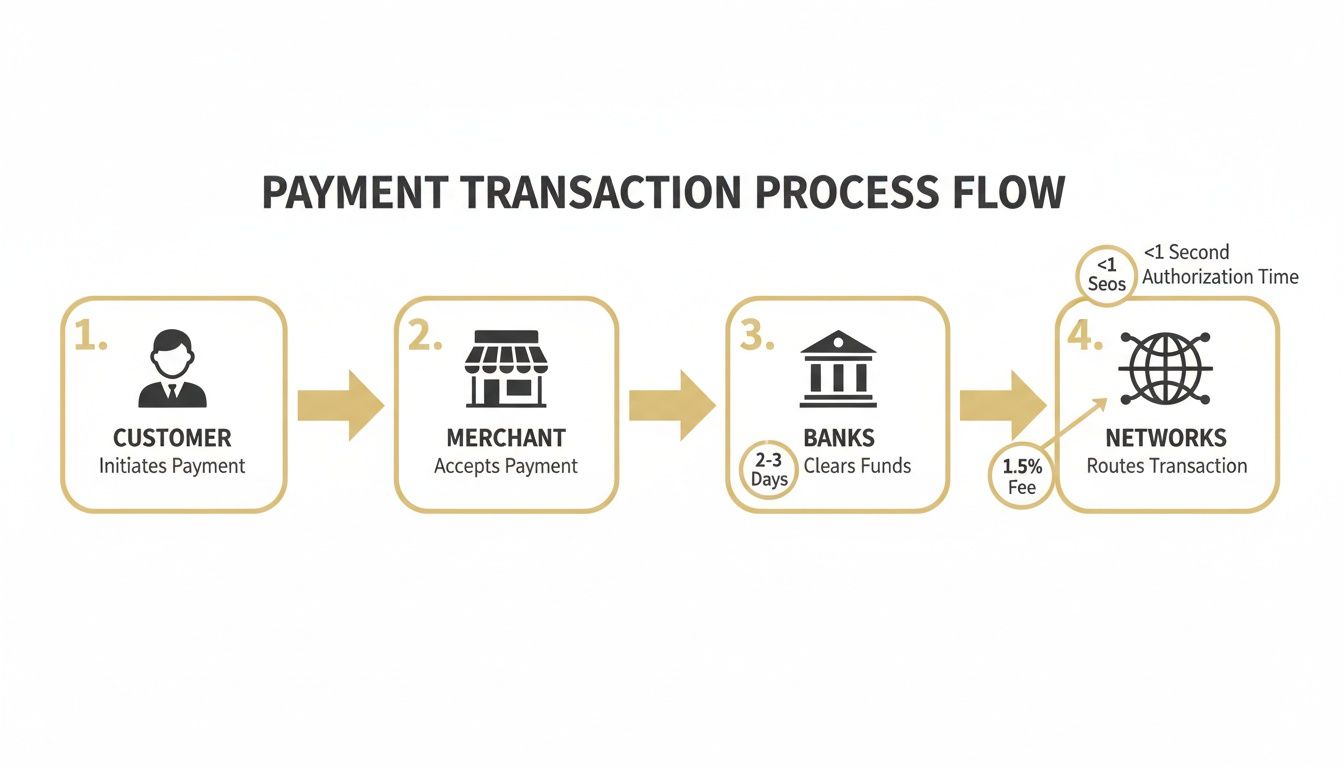
Each step involves multiple players communicating in milliseconds to make sure the transaction is valid, secure, and correctly routed. Let's walk through each stage of the journey.
Stage 1: Authorization – The Initial Green Light
Authorization is the very first, lightning-fast step. Think of it as your payment system asking the customer's bank, "Hey, is this person good for the money?"
Let’s say a customer buys a $5 coffee. They tap their card, and your terminal (or online gateway) immediately sends an authorization request. That request zips from your acquiring bank, through the card network (like Visa or Mastercard), all the way to the customer's issuing bank.
The issuing bank runs a few quick checks:
- Does the account actually have enough funds or available credit?
- Is the card reported as lost or stolen?
- Are there any unusual patterns that might suggest fraud?
Within one to two seconds, the bank sends back a simple "approved" or "declined" message. If it's a yes, you get an authorization code. This code is like a temporary hold—the money hasn't moved yet, but it's been officially earmarked for you.
Stage 2: Capture – Claiming the Funds
Getting that authorization code is a great start, but it doesn't mean you've been paid. The capture stage is where you, the merchant, formally tell the processor, "Okay, I'm ready to collect the funds you put on hold for me."
This is usually done in a batch at the end of the business day. Your point-of-sale system or e-commerce platform gathers all the day's successful authorizations and sends them off in one go. This is why you often see a "batch out" or "close out" function on payment terminals.
For example, your coffee shop might have processed 200 card transactions. At closing time, you "batch out," sending 200 capture requests at once. This tells the processor that the sales are final and you're officially ready to get paid.
Why the Two-Step Process? Separating authorization and capture gives merchants critical flexibility. A hotel, for instance, might authorize a card for an estimated amount at check-in but only capture the final bill—which could be different—at checkout.
Stage 3: Clearing – The Great Reconciliation
Once you've captured the funds, the clearing process kicks in. This is a massive, behind-the-scenes accounting exercise where all the banks and card networks figure out who owes what to whom. It's like a giant daily reconciliation for every single transaction.
Your payment processor sends your batch of captured transactions to the card network. The network then sorts everything out, telling the various issuing banks to send money to your acquiring bank. At this stage, no actual money has moved; it's all an exchange of data and IOUs.
The scale of this operation is staggering—it's the backbone of global commerce. In 2024 alone, this system is projected to manage $2.0 quadrillion in value across 3.6 trillion transactions. The rise of cross-border payments, expected to hit $222.1 billion by 2025, just adds another layer of complexity to this global financial dance. You can discover more about global payment trends on mckinsey.com.
This is why there's a delay. All parties involved have to tally up the day's numbers before any money actually changes hands.
Stage 4: Settlement – Getting Paid
Finally, the stage that matters most to you: settlement. This is when the money is actually transferred from the customer’s issuing bank, through the system, and into your merchant account.
After the card networks have cleared all the transactions, they instruct the issuing banks to wire the funds to the acquiring banks. Your acquiring bank receives the money, subtracts all the processing fees (interchange, assessments, and their own markup), and then deposits the final net amount into your business bank account.
This whole cycle, from that initial tap to money in your account, typically takes 24 to 72 hours. The exact timing can vary based on your processor and the day of the week, which is why a big Friday sale might not show up until Monday or Tuesday. This is just the fundamental reality of how payment processing works, ensuring every dollar is tracked and accounted for.
Decoding Your Payment Processing Fees
For most business owners, payment processing fees feel like a black box—a necessary evil you just have to accept. Trying to make sense of a monthly statement can feel like cracking a code, with a jumble of percentages and per-transaction charges that don't add up easily. But it doesn't have to be that way.
Once you pull back the curtain and see how these fees are actually put together, you’ll get a much clearer picture of where your money is going and why.
Think of the total fee for a single transaction as one pie that gets cut into three different-sized slices. Each slice goes to a different player in the payment world, paying them for their part in making the sale happen smoothly and securely.
The Three Core Fee Components
Every single time a customer pays with a credit or debit card, the fee you're charged is a blend of three separate costs. Your processor might lump them all together into one simple rate, but knowing the individual ingredients is the key to truly understanding the financial side of payment processing.
Interchange Fees: This is the big one, making up 70-80% of your total cost. It's a non-negotiable fee that goes straight to the customer's bank (the bank that issued their credit card, like Chase or Bank of America). The rates are set by the card networks—Visa, Mastercard, and so on—and they change based on risk. Things like card type (a fancy rewards card costs you more), how the transaction happened (online is riskier than in-person), and even your industry all play a part. Basically, this fee pays the issuing bank for the risk of fraud and the cost of all those juicy rewards points.
Assessment Fees: This is a much smaller slice of the pie, paid directly to the card networks themselves. You can think of it as a licensing or network access fee for using their payment rails. Just like interchange, these fees are set in stone and are usually a tiny percentage of your sales volume.
Processor Markup: Finally, we get to the only part you can actually negotiate. This is what your payment processor (like Stripe, Square, or a traditional merchant provider) charges for their services. This markup is how they cover their own costs—customer support, the payment gateway technology, fraud tools—and, of course, turn a profit.
Understanding this breakdown gives you a bit of leverage. While you can't do anything about interchange or assessment rates, you can shop around and have a real conversation about the processor's markup. For a look at how specialized services approach costs, you can see how transparent Disputely pricing is structured.
Sample Breakdown of a $100 Transaction Fee
Let's make this real. A customer just bought a $100 item from your online store and paid with their go-to rewards credit card. Your total processing fee might be around $2.90. The table below shows a typical breakdown of where that money actually ends up.
| Fee Component | Typical Rate | Cost on $100 Sale | Who Gets Paid |
|---|---|---|---|
| Interchange Fee | ~1.8% + $0.10 | ~$1.90 | The customer's issuing bank (e.g., Chase) |
| Assessment Fee | ~0.15% | ~$0.15 | The card network (e.g., Visa) |
| Processor Markup | ~0.85% + $0.05 | ~$0.85 | Your payment processor (e.g., Stripe) |
| Total Fee | ~2.8% + $0.15 | ~$2.90 | All Parties |
As you can see, the lion's share of the fee doesn't even go to your processor—it goes right back to the bank that issued the customer's card.
This fee structure is precisely why a premium travel rewards card costs you more to accept than a basic debit card. The issuing bank charges a higher interchange fee on the rewards card to cover the cost of the points or miles it gives to the cardholder.
Grasping this fundamental model is the first step to mastering your costs. Instead of seeing one big, mysterious deduction on your statement, you can now see the individual parts at play. That knowledge is power, and it’s what allows you to manage your payment expenses instead of just accepting them.
How Modern Payments Protect Customer Data
When a customer hands over their payment details, they’re giving you more than just numbers—they’re giving you their trust. A single data breach can shatter that trust, and your reputation, in a heartbeat. That’s why a secure payment process isn't just a technical nice-to-have; it's a fundamental part of doing business.
The good news is that modern payment systems are designed with layers of defense to protect that sensitive data from the moment a customer clicks "buy." Your payment partner does most of the heavy lifting here, but it’s crucial to understand your role in this security chain to protect both your business and your customers.
The entire system is built on a shared set of security standards. These rules ensure that everyone involved in handling card data, from a small online boutique to a massive retailer, is playing by the same high-security playbook.
Following the Rules with PCI DSS Compliance
The absolute foundation of payment security is the Payment Card Industry Data Security Standard (PCI DSS). This isn't a government law, but a set of rigorous security rules established by the major card brands like Visa and Mastercard. If your business accepts, processes, stores, or transmits credit card information, you are required to be PCI compliant.
Think of PCI DSS as the essential security checklist for your business. It covers the non-negotiables:
- Building and maintaining a secure network firewall.
- Encrypting cardholder data when it's in transit.
- Regularly testing your security systems and processes.
Failing to meet these standards isn't just a security gamble. Non-compliance can result in steep fines, restrictions on your ability to accept cards, and in the worst-case scenario, the termination of your merchant account.
For most merchants, the simplest way to stay compliant is to work with a payment processor that is already fully PCI compliant. They provide the secure payment gateways and systems that take the burden off your shoulders, meaning you never have to handle raw, sensitive card data on your own servers. This brings us to the two key technologies that make this secure, hands-off approach possible.
How Encryption and Tokenization Work Together
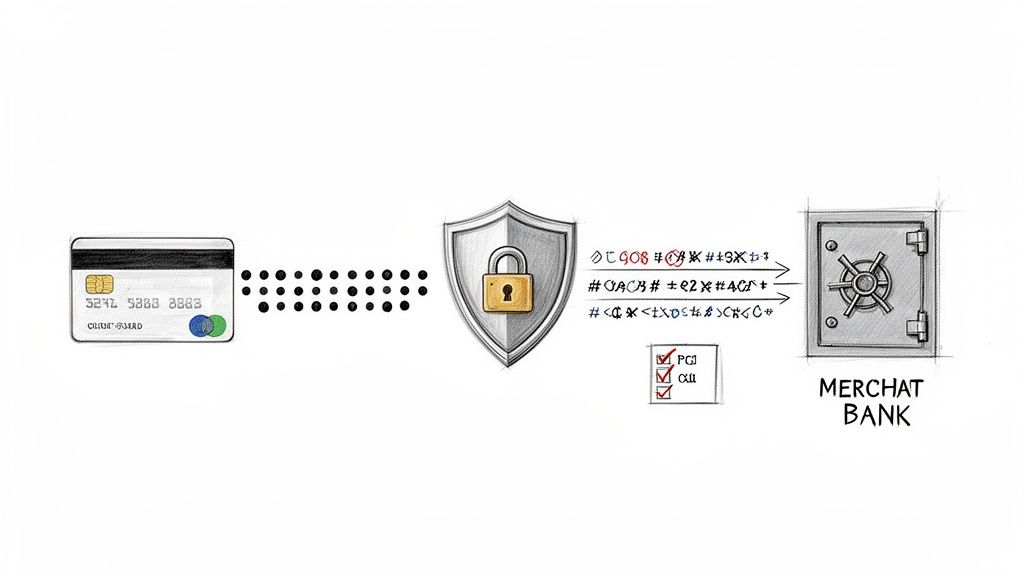
To really get how modern payments stay secure, you need to understand two key concepts: encryption and tokenization. They work hand-in-hand, almost like a secret code kept inside a locked vault, rendering card data completely useless to any thief who gets their hands on it.
First, Encryption scrambles the data into an unreadable format the moment it leaves your customer's browser. It’s like putting a letter into a sealed, coded envelope before mailing it. Only the intended recipient—the payment processor—has the special key to unscramble the message.
Then, Tokenization takes security to the next level. Once the processor safely receives the encrypted data, it swaps the sensitive 16-digit card number for a unique, non-sensitive placeholder called a "token." You can think of this token as a secure claim check.
This token is what you'll use for things like recurring billing or processing refunds. If a data breach ever hit your system, hackers would only find a list of worthless tokens, not actual credit card numbers. The real card data stays locked away in your processor’s secure vault. This powerful one-two punch is a cornerstone in the fight against fraud, which is responsible for around $40 billion in global losses each year. You can discover more payment industry stats on paycompass.com.
Getting a Handle on Chargebacks (And How to Stop Them)
While the whole payment process is built to move money from the customer to you, there’s a powerful reverse gear designed to protect consumers: the chargeback. For a merchant, a chargeback is a whole lot more than just a refund. It's a costly, draining, and potentially business-threatening event.
A chargeback kicks in when a customer doesn't come to you for a refund, but instead goes straight to their bank to dispute a charge. The bank then forcibly yanks those funds right out of your merchant account. This system was born decades ago to give people the confidence to use credit cards, assuring them they wouldn't be on the hook for fraud or shady merchants.
But what started as a consumer shield has become a major headache for businesses. Every single chargeback is a triple-whammy: you lose the sale revenue, you're out the cost of the goods or services, and you get slapped with a punitive chargeback fee from your processor, typically between $20 and $100 a pop.
Common Triggers for Costly Chargebacks
If you want to stop chargebacks, you first have to understand why they happen. Most disputes boil down to just a few core reasons. Some are obvious fraud, but many start as simple mix-ups that snowball into a financial mess.
Here are the usual suspects:
- True Fraud: This is the classic scenario where a criminal uses a stolen credit card to buy something. It’s straight-up theft, and the merchant is almost always the one left holding the bag.
- Item Not Received: The customer swears they paid for something that never showed up. This could be a legitimate shipping SNAFU, a lost package, or a failure on your end to get the order out the door.
- Significantly Not as Described: What the customer got is wildly different from what they thought they were buying. Think: a product that’s damaged, missing pieces, or the completely wrong size or color.
Then there's the big one: "friendly fraud." This is when a legitimate customer disputes a legitimate charge. They might not recognize your business name on their statement, forgot they bought it, or just have a case of buyer's remorse. Astonishingly, it's estimated that up to 86% of all chargebacks are actually friendly fraud.
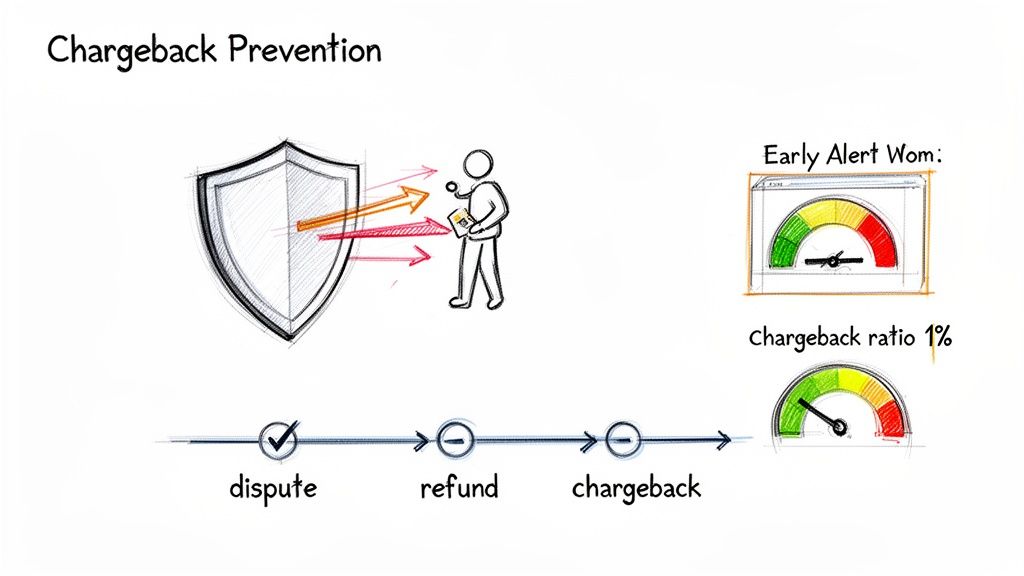
The Chargeback Ratio: Your Most Important Metric
In the world of disputes, there is one number you absolutely have to know: your chargeback ratio. This is simply the number of chargebacks you get in a month divided by your total number of sales for that same month.
For example, if you had 10 chargebacks on 2,000 transactions in June, your ratio is 0.5%.
Why does this single percentage matter so much? Because the card networks—Visa and Mastercard—are watching it like a hawk. They have very specific thresholds for what they consider acceptable risk. If your ratio starts to creep up, they see your business as a liability.
The universally accepted danger zone is a 1% chargeback ratio. If your business consistently floats above this number, you're looking at some serious consequences:
- Hefty Fines: The card networks will begin hitting you with thousands of dollars in monthly penalties.
- Account Freezes: Your payment processor might put a hold on your payouts or set up a "rolling reserve," locking up a chunk of your cash flow.
- Account Termination: This is the worst-case scenario. Your merchant account gets shut down entirely, making it nearly impossible to accept credit cards anywhere.
This is exactly why just waiting for chargebacks to happen and then dealing with them is a losing game. You need a proactive plan to stop disputes before they're ever filed. A good place to start is exploring how a proactive chargeback representment strategy can defend your revenue and keep your merchant account in good standing.
How Real-Time Alerts Stop Chargebacks Before They Happen
Reacting to a chargeback after it hits your account is always a losing game. It’s stressful, costly, and puts your business relationship with your payment processor on shaky ground. But what if you could get a heads-up that a customer was unhappy before they officially filed that dispute? That’s precisely what real-time dispute alerts are for.
Think of this technology as an early-warning system. It completely changes the game from reactive damage control to proactive problem-solving. It's the single most effective way to intercept a chargeback before it ever becomes a real threat to your business and your chargeback ratio.
The Power of the Pre-Dispute Window
Leading the charge are a couple of powerful networks created by the card brands themselves. You’ve got Visa’s Rapid Dispute Resolution (RDR) and Mastercard’s Chargeback Dispute Resolution Network (CDRN). These systems create a direct line of communication between your business and the banks that issue your customers' cards.
Here’s a play-by-play of how it works:
- A customer calls their bank to question a charge from your store.
- Instead of the bank immediately starting the chargeback process, they first send a real-time alert through the RDR or CDRN network.
- That alert lands with you, kicking off a critical 24- to 72-hour window for you to do something about it.
This small window is your golden opportunity. You get to see the customer’s complaint and resolve it directly—usually by issuing a refund—before it escalates into a full-blown, damaging chargeback.
This is a fundamental shift in the process. Rather than the customer's bank forcing a chargeback on you, the system creates a pause. It gives you a chance to make things right first and turns a potential conflict into a customer service win.
Automating Prevention for Maximum Impact
Now, trying to catch and handle these alerts manually would be a nightmare for any busy merchant. That's where a service like Disputely comes in. By connecting directly to your payment processor, we monitor for these incoming alerts around the clock.
This is what it looks like inside Disputely—you can build custom rules to automatically handle alerts the second they arrive.
For example, you could set up a rule to automatically refund any alerted transaction under $50. This guarantees you never miss that short resolution window and the chargeback is stopped dead in its tracks.
This automated approach pays off big time. For any legitimate complaint, a refund gets processed instantly, the customer is happy, and the chargeback is completely avoided. Not only do you save the lost revenue and avoid punitive fees, but you also protect the health of your merchant account by keeping your dispute ratio safely below that dreaded 1% threshold.
By plugging into these real-time alert systems, you’re not just managing disputes; you’re eliminating them before they can start. It’s an essential strategy for any business serious about securing its payment processing, avoiding penalties, and staying in good standing with the card networks. It's the modern answer to an age-old merchant headache.
Your Top Payment Processing Questions, Answered
Even with the transaction lifecycle laid out, you're bound to have a few more specific questions. Let's tackle some of the most common things merchants ask about the nitty-gritty of getting paid.
What’s the Real Difference Between a Payment Gateway and a Processor?
It helps to think of it like this: the payment gateway is the digital equivalent of a physical credit card terminal on your countertop. It’s the secure bouncer for your online store—it collects the card details, encrypts them, and safely passes them along for the next step. It’s the first point of contact.
The payment processor is the one that does the heavy lifting behind the scenes. It takes that encrypted information from the gateway and actually communicates with the card networks and banks to shuttle the money from your customer’s account into yours. These days, all-in-one platforms like Stripe or PayPal bundle both of these functions, so you often don't see the distinction, but they are two separate jobs.
How Long Until I Actually Get My Money?
From the moment a customer clicks "buy" to the cash landing in your bank account, you can typically expect it to take 2-3 business days. This is called settlement.
That delay isn't random. It’s built into the system because processors and banks "batch" transactions together at the end of the day for clearing and reconciliation. The exact timing can shift based on your processor's schedule, your industry's risk profile, and even what day of the week the sale was made.
A common myth is that online payments are instant. The authorization takes just a few seconds, but the actual money movement is a slower, more methodical dance between multiple financial institutions.
Why Is Fighting Every Single Chargeback a Bad Idea?
It feels instinctual to defend every sale, but fighting every chargeback is a classic rookie mistake that can seriously backfire. For starters, it’s a massive time sink. But more importantly, every dispute filed against you—whether you win or lose—hits your dispute ratio.
The card networks watch this metric like a hawk. If your ratio climbs over their threshold (usually around 1%), you’re heading for trouble. This can lead to heavy fines, higher processing fees, and in the worst-case scenario, having your merchant account shut down completely. A much smarter strategy is to use dispute alerts to prevent chargebacks from ever happening and save your energy for fighting only those you have iron-clad evidence to win.
What’s the Single Best First Step to Reduce Disputes?
Fix your billing descriptor. Seriously. This is the little piece of text that shows up next to the charge on a customer's credit card statement.
If it's something cryptic like "SP *WEBSERVICES," you're practically inviting a dispute. Your customers won't recognize it and will assume it's fraud. Make sure it clearly shows your brand name and maybe a customer service phone number. This one small change can stop a huge percentage of "friendly fraud" disputes before they even start.
Stop letting preventable disputes eat into your revenue. With Disputely, you can connect your payment processor in just a few minutes and put your chargeback prevention on autopilot. Find out how much you could be saving and protect your business for the long haul.


