
Mastering processing recurring payments: the lifecycle of automated billing
Processing recurring payments is how businesses automatically charge customers on a regular schedule—think monthly or yearly. Instead of chasing invoices, it sets up an authorized 'digital handshake' that keeps revenue flowing for subscription services, SaaS platforms, and membership sites. It’s the engine that keeps the modern subscription economy running.
The Foundation of Subscription Success
At its heart, recurring payment processing is the financial bedrock for any business built on repeat customers. It’s a huge leap from a simple one-time purchase to an ongoing financial relationship. This automated system is what lets streaming services, software companies, and subscription box businesses operate smoothly and scale without chaos. For them, predictable revenue isn't just nice to have—it's everything for forecasting, budgeting, and growth.
The whole thing works by securely capturing a customer's payment details when they first sign up. That sensitive data is immediately swapped out for a secure token in a process called tokenization. This token acts as a substitute for the actual card details, letting the business charge it again and again without ever storing the raw credit card number. That single step is a game-changer for both security and PCI compliance.
Why Automated Billing Matters
The move to automated billing is more than just a convenience; it's a fundamental shift in how commerce works. The global recurring payments market, valued at $262.58 billion in 2025 and still climbing, proves it. You can dig into the numbers in The Business Research Company's market overview. This massive growth is happening for good reason—the benefits are real for everyone involved.
For businesses, the advantages are hard to ignore:
- Predictable Cash Flow: It takes the guesswork out of revenue forecasting, giving you a stable financial baseline to work from.
- Reduced Administrative Work: Your team is freed from the soul-crushing task of manually sending invoices and chasing down payments.
- Enhanced Customer Retention: A seamless payment experience helps prevent involuntary churn from things like missed payments or expired cards.
By automating the billing cycle, you transform a transactional customer relationship into a continuous one. The focus shifts from chasing payments to delivering ongoing value, which is the key to long-term loyalty and reduced churn.
Ultimately, getting a handle on how to process recurring payments is the first step toward building a business that can last and grow. It’s not just about collecting money; it’s about creating a solid financial infrastructure that supports you for the long haul.
The Recurring Payment Lifecycle: From Sign-Up to Success
When a customer hits that "subscribe" button, they're not just making a one-time purchase. They're kicking off a complex, automated dance that happens entirely behind the scenes—a cycle that forms the very foundation of any subscription business. This isn't just a single event; it's a continuous loop built for security, reliability, and, most importantly, predictable revenue.
To really nail your recurring payment strategy, you have to understand this journey from start to finish. Let's break down the core stages that happen in the blink of an eye.
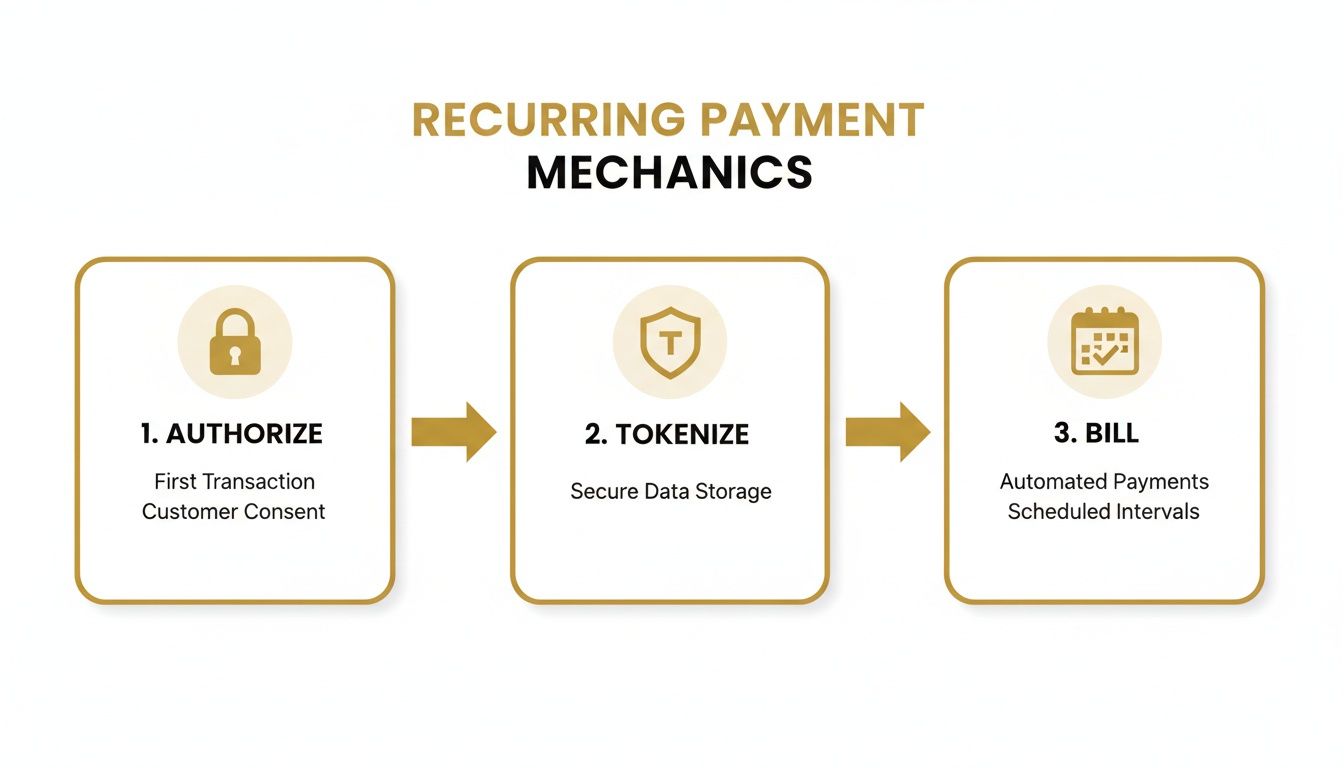
As you can see, it all starts with an initial thumbs-up (authorization), gets locked down for security (tokenization), and then shifts into cruise control for automated billing.
Stage 1: The Initial Authorization
The moment a new customer types in their credit card details and agrees to your terms, the first step begins. This initial transaction is special because it does two jobs at once: it processes their first payment and it asks their bank for permission to save these payment details for all future charges.
Think of it like checking into a hotel. You hand over your credit card at the front desk (your payment gateway), and they run it to make sure the card is valid and has funds. This pre-authorization check gives them the green light to charge your room and any incidentals later. The same thing happens here—it’s a critical handshake that validates the payment method for the entire life of the subscription.
Often, this initial authorization is a tiny charge, sometimes just a $0 or $1 verification, simply to confirm the card is legitimate before the real billing cycle kicks in.
Stage 2: Secure Tokenization
Once the customer's bank gives that first nod of approval, the most important security step happens instantly: tokenization. Instead of storing your customer's sensitive 16-digit card number on your servers (which is a huge security risk), the raw data is sent to your payment processor.
The processor then works its magic, swapping the actual card number for a unique, unbreakable string of characters called a token.
This token is essentially a secure placeholder. Your system only ever stores this token, which is completely useless to a hacker if they ever breach your database. This single step dramatically shrinks your PCI compliance burden because you're no longer handling raw cardholder data.
It’s like replacing the cash in a vault with a special chit that only the bank can redeem for real money. Even if a thief cracks the vault, all they get is a worthless piece of paper. That's how modern recurring payment systems deliver convenience without sacrificing security.
This is the technology that powers the subscription management tools you see in platforms like Stripe. When you set up a billing plan, you're really just telling the system which secure token to charge and how often.
Stage 3: Automated Billing and Settlement
With a secure token safely on file, the "recurring" part of the process truly begins. Your billing system now has everything it needs to automatically charge the customer based on their plan—whether it's weekly, monthly, or annually.
Each time a payment is due, the same automated sequence fires off:
- Scheduled Charge: Your system tells the payment gateway, "It's time to charge this token for $X amount."
- Processor Communication: The gateway securely sends the token and transaction details to the processor.
- Network Transaction: The processor then talks to the card networks (like Visa or Mastercard) and the customer's bank to request the funds.
- Approval or Decline: The bank sends back a simple yes or no. If it's a yes, the money is earmarked for you.
- Settlement: Finally, the funds are moved from the customer's bank to your merchant account. This last step, called settlement, usually takes a few business days.
This cycle repeats like clockwork for every customer, every billing period, creating that steady, predictable revenue stream that makes the subscription model so powerful. This automated engine is what allows a business to scale from 100 subscribers to 100,000 without drowning in manual billing tasks.
How to Handle Failed Payments and Recover Revenue
Let's be honest: even with a perfectly tuned recurring payment system, payments will eventually fail. It’s an unavoidable reality of running a subscription business. These aren't just minor technical glitches; they are silent revenue killers that quietly eat away at your customer base, one declined transaction at a time.
A customer’s card expires, they accidentally hit their credit limit, or their bank's fraud system gets a little overzealous. Just like that, a happy, loyal subscriber is on the verge of churning, often without even realizing there’s a problem.
And this isn't a small problem. Payment failures are one of the biggest drivers of involuntary churn—when customers leave for reasons completely out of their control. Industry data consistently shows that involuntary churn can be responsible for up to 40% of total customer churn.
Worse yet, many customers simply give up. Research shows that 27% of subscribers will cancel immediately after a payment is declined, purely out of frustration with the process.
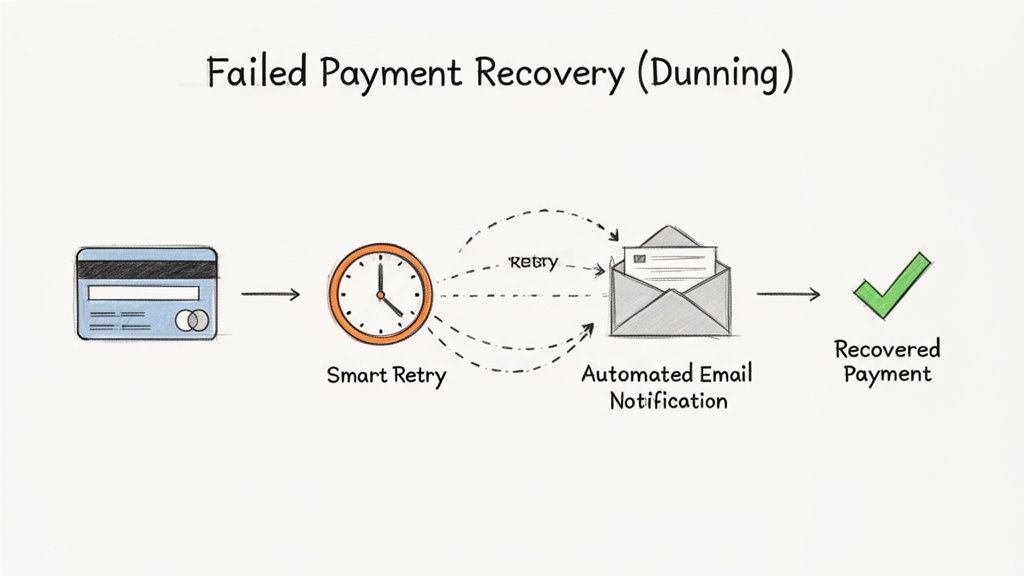
The good news? You can absolutely fight back with a smart, automated strategy known as dunning management.
So, What Exactly is Dunning Management?
The word "dunning" might sound harsh, like you're sending out a collections agent. But in the world of modern recurring payments, it's nothing like that. It's a strategic, automated process of communicating with customers about billing failures to get the payment sorted out and, most importantly, keep them as a customer.
Think of it as your friendly, automated accounts receivable assistant, working around the clock to rescue failed transactions before they turn into lost customers.
A solid dunning system is much more than a single "payment failed" email. It’s a carefully choreographed sequence of gentle nudges and intelligent actions designed to solve the problem without creating a terrible customer experience.
Don't Just Retry—Retry Smart
When a payment fails, the gut reaction is often to just try it again. And again. But hammering a customer's bank with repeated attempts is a great way to get your transactions flagged as suspicious and rarely works. This is where smart retry logic comes into play.
Instead of a brute-force approach, a smart system looks at the failure code from the payment processor to understand why the transaction was declined.
- Soft Declines: These are usually temporary hiccups, like "Insufficient Funds" or a generic "Do Not Honor." A smart retry strategy won’t try again immediately. It will wait a few days, giving the customer time to top up their account or for the bank's temporary block to clear.
- Hard Declines: These are permanent roadblocks, like "Invalid Card Number" or "Stolen Card." Retrying these is a total waste of time and resources. The system should immediately stop trying to charge the card and trigger a notification to the customer instead.
A great retry schedule isn't random. A common, effective cadence might look like this: try again in 3 days, then 5 days after that, and a final attempt 7 days later. This intelligent pacing gives customers a real chance to fix the issue on their end.
The Right Words at the Right Time
While automation does the heavy lifting, the human touch in your communications is what truly makes the difference. Your dunning emails should feel helpful and reassuring, not like an accusation. The goal is to make it dead simple for the customer to pop in their new payment details and get on with their day.
Here are the must-have communications to automate:
- Pre-Dunning Notices: Send a friendly heads-up a week or two before a customer's credit card is due to expire. This one proactive email can stop a payment failure from ever happening in the first place.
- Payment Failure Alerts: The moment a payment fails, send an immediate, clear notification. The email should simply explain what happened and include a direct, secure link where they can update their billing information.
- Grace Period Reminders: If the payment is still outstanding, don't just cancel the subscription. Give them a "grace period" and send a couple of follow-up reminders. Let them know their access might be interrupted, but frame it as a helpful nudge to keep their service active.
By combining smart retries with clear, empathetic communication, you can turn a moment of friction into a positive experience that saves a customer. This process is also a huge part of chargeback prevention; a customer who feels ignored or poorly treated during a billing issue is far more likely to file a dispute. Getting a handle on the chargeback representment process will give you a complete picture of how to manage customer payment issues from start to finish.
Building Trust with Secure and Compliant Payments
Let's be honest: security isn't just a technical box to check. It’s the bedrock of your relationship with your customers. When someone trusts you with their payment details for a subscription, they’re not just buying a product; they’re buying into the idea that you'll protect their sensitive information. Mess that up, and you don’t just lose a customer—you damage your reputation.
Diving into payment compliance can feel like navigating a maze of acronyms and regulations. But it all comes down to a few core ideas designed to protect everyone involved. Getting these right is your first step toward building a payment system that people feel good about, encouraging them to stick around for the long haul.
Demystifying PCI DSS Compliance
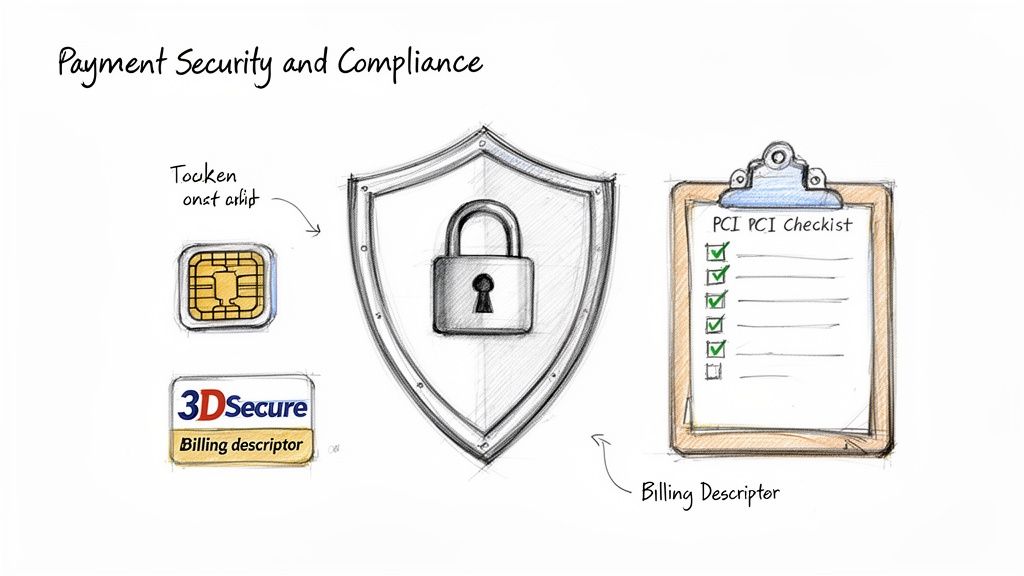
The Payment Card Industry Data Security Standard (PCI DSS) is the rulebook for anyone who handles credit card data. It's a strict set of requirements built to stop fraud and prevent data breaches. For any subscription business, there's a simple path to making this manageable: tokenization.
As we touched on earlier, tokenization is a lifesaver. It replaces raw credit card numbers with a secure, unique token. This means the sensitive data never even hits your servers, which dramatically shrinks your compliance burden and risk. Your payment processor takes on the heavy lifting of securely storing the actual card details, while you just use the safe token to process recurring charges. It’s a win-win.
Meeting Strong Customer Authentication Mandates
If you have customers in Europe, you absolutely need to know about Strong Customer Authentication (SCA). It's a legal requirement under the PSD2 regulation that adds an extra layer of security to online payments.
Think of it as a bouncer for digital transactions. To get in, the customer has to prove their identity using two of these three things:
- Knowledge: Something only they know (like a password or PIN).
- Possession: Something only they have (like their phone to receive a code).
- Inherence: Something they are (like their fingerprint or face ID).
This is where technology like 3D Secure 2 (3DS2) comes in. It’s a smart authentication protocol that can tell if a transaction looks risky. For a low-risk recurring payment, it might run silently in the background without bothering the customer. But for a brand new sign-up, it might ask for that extra proof, like a quick code sent to their phone, just to be safe.
Security and compliance are not just about avoiding fines; they're about demonstrating that you value your customers' data. Central to secure recurring payment processing is establishing a robust framework for building consumer trust through secure data practices, ensuring customer confidence in your systems.
Proactively Preventing Chargebacks and Disputes
Chargebacks are a constant headache for subscription businesses and can seriously threaten your merchant account. While you can't stop every single one, you can prevent a huge number of them that stem from pure confusion. The best defense is a good offense.
Start with something simple: your billing descriptor. This is the short line of text that shows up on a customer’s credit card statement. It needs to be crystal clear. If a customer sees a vague charge like "SUBSCRIPTION SRVC," they’re going to assume it’s fraud and file a dispute. Make sure it’s instantly recognizable with your brand or product name.
Also, don't bury your terms of service or cancellation policy. Hiding the fine print only leads to frustrated customers who feel like their only option is to file a chargeback. Be upfront and make it easy for people to find the information they need. For a solid example of how to present this kind of information clearly, you can check out our privacy policy. These small, foundational steps go a long way in building trust and cutting down on expensive disputes.
Choosing and Configuring Your Payment Processor
Picking the right payment processor is one of the most critical decisions you'll make when setting up your subscription business. This isn't just about finding a vendor; you're choosing a partner that will form the backbone of your entire revenue operation. Your choice will ripple through everything, from the transaction fees you pay and the checkout experience your customers get to your ability to fight churn and expand globally.
Let's cut through the marketing fluff and get into the practical, hands-on setup for the big players in the industry. Each one offers powerful tools for managing subscriptions, but they all have their own quirks and strengths. Knowing these differences is the key to picking the right one from the start—or getting more out of the one you’re already using.
Stripe for Subscription Businesses
For most SaaS and subscription-first companies, Stripe is the default choice, and for good reason. Its developer-first approach and powerful APIs make it incredibly flexible. The heart of its subscription engine is Stripe Billing.
When you're getting set up, your main job is to create "Products" and "Prices" in your dashboard. Think of a Product as the what (e.g., "Pro Membership") and a Price as the how much and how often (e.g., "$29/month"). Once those are defined, you can easily attach them to a "Subscription" for any customer.
The real magic of Stripe is its automation. Its dunning features, which are built right into Stripe Billing, will automatically retry failed payments using smart logic and send out reminder emails you can customize. This system alone can claw back a huge chunk of revenue you’d otherwise lose to involuntary churn.
Getting started is pretty straightforward: set up an account, define your products, and integrate the checkout. To get a feel for the initial groundwork, understanding the process of installing Stripe is a great first step in building out your recurring payment system.
PayPal for Broad Reach
PayPal is a household name, and its biggest advantage is the immense trust and familiarity it has with millions of people around the globe. For recurring payments, you’ll be using PayPal Subscriptions.
The setup here involves creating a "Subscription Plan" within your business account. This is where you define things like the plan’s name, different pricing tiers, and the billing cycle. After a customer signs up, PayPal takes care of the recurring charges on its own. If you need more flexibility, you can dig into "Reference Transactions," a developer tool that lets you bill customers for varied amounts and on custom schedules after they give initial approval.
One thing to watch out for is making sure your account is configured correctly to handle these automated payments. If you're new to this world, following the platform's guidelines is crucial. For a good sense of what the onboarding process looks like with a major processor, our guide to signing up for Stripe offers a helpful comparison.
Shopify Payments for Ecommerce Stores
If you run your business on Shopify, using Shopify Payments is usually the simplest path forward. It’s built directly into the platform, but there's a catch: it doesn't handle subscriptions on its own.
To process recurring payments, you’ll need to install a third-party subscription app from the Shopify App Store. Popular options like ReCharge, Bold Subscriptions, or Appstle plug directly into Shopify Payments to manage the billing cycles, customer portals, and dunning. This means most of your configuration will happen inside the app's dashboard, not Shopify's. You’ll be setting your subscription rules, delivery frequencies, and cancellation policies there.
Authorize.net for Enterprise Needs
Authorize.net has been around for a long time and is often the go-to for larger businesses or companies that already have a traditional merchant account. Their solution for subscriptions is called Automated Recurring Billing (ARB).
Setting up ARB means creating a "Subscription" directly within the Authorize.net merchant interface. You'll need to manually input the customer's payment details, the billing amount, the full schedule (start date, frequency, and total number of payments). While its dashboard feels a bit dated compared to Stripe, its rock-solid reliability makes it a dependable choice for established enterprises that need a robust billing engine.
Recurring Payment Features Comparison of Major Processors
Choosing a processor often comes down to which features you need most. Here’s a quick side-by-side look at how these four platforms handle the core functions of subscription billing.
| Feature | Stripe | PayPal | Shopify Payments | Authorize.net |
|---|---|---|---|---|
| Core Subscription Engine | Stripe Billing (built-in) | PayPal Subscriptions | Requires a third-party app (e.g., ReCharge) | Automated Recurring Billing (ARB) |
| Dunning & Retries | Smart Retries, customizable email flows | Basic retries, less customization | Handled by the third-party subscription app | Configurable retries, but less "smart" |
| Developer API | Extremely powerful and well-documented | Good, with options for Reference Transactions | API access is through the third-party app | Robust but considered older and less modern |
| Ideal User | SaaS, startups, subscription-first models | Businesses wanting broad customer trust | Ecommerce stores on the Shopify platform | Large enterprises, businesses with merchant accounts |
| Customer Portal | Pre-built, customizable portal | Basic management within PayPal account | Provided and customized via the third-party app | Basic functionality; often requires custom dev |
As you can see, there’s no single "best" option—the right choice depends entirely on your business model, technical resources, and the platform you're already using.
Fine-Tuning Your Recurring Revenue Engine
Once you have the basics of recurring payments running, the real work begins. It’s not just about setting things up and letting them run; it's about actively managing the system to keep your revenue healthy and your customers happy. Think of it less like a vending machine and more like a high-performance engine that needs regular tuning.
Nail Your Billing Descriptor
Your first line of defense against disputes is something surprisingly small: the line of text on your customer's credit card statement. A generic descriptor like "WEB SERVICES LLC" is an open invitation for a confused customer to file a chargeback. Even your happiest subscribers might not recognize an obscure company name.
This is often called friendly fraud—when a customer disputes a charge they actually made, simply because they didn't recognize it. The fix is simple: make your billing descriptor unmistakably clear. A format like "YourBrand*ProductName" or "YourBrand*Subscription" leaves no room for doubt.
Make Cancellation Easy (Seriously)
It sounds counterintuitive, but one of the best ways to keep customers is to make it easy for them to leave. Hiding the cancellation button or forcing people to call a support line only breeds frustration. That frustration is a direct path to a chargeback, which is far more damaging than a simple cancellation.
When customers know they can cancel anytime without a hassle, it builds trust. They feel in control, which paradoxically makes them more likely to stick around or even come back later. A clear, one-click cancellation process is a sign of a confident brand.
Automate Card Updates to Prevent Failures
A huge chunk of failed recurring payments isn't due to a lack of funds; it's because a credit card expired. This is what we call involuntary churn, and it’s a silent revenue killer.
The best tool to fight this is an account updater service. This service automatically communicates with card networks (like Visa and Mastercard) to refresh saved card information. When a customer's card expires and a new one is issued, the system updates it behind the scenes.
Your customer doesn't have to do a thing, their service continues uninterrupted, and you avoid a failed payment and a potential cancellation. It’s a win-win.
Get Ahead of Chargebacks with Alerts
No matter how perfect your system is, some disputes will happen. The key is to handle them before they officially become chargebacks, which damage your standing with payment processors.
Chargeback alert services are designed for this. They notify you the moment a customer contacts their bank to dispute a charge. This gives you a critical window—usually 24 to 48 hours—to act. Instead of fighting a losing battle, you can simply issue a refund. This stops the dispute from escalating into a formal chargeback.
For example, a modern chargeback management dashboard gives you a real-time view of these brewing disputes.
This kind of proactive monitoring helps you keep your dispute rate low, which is essential for maintaining a healthy merchant account and avoiding steep penalties. By adopting these practices, you turn your payment system from a simple necessity into a strategic asset for growth.
Answering Your Top Questions About Recurring Payments
Even with the best strategy, you're bound to run into some specific questions when you're in the weeds of managing subscriptions. Let's tackle some of the most common ones that pop up for merchants.
What’s the Real Difference Between a Payment Gateway and a Payment Processor?
It’s easy to get these two mixed up, but a simple analogy can clear it up.
Think of a payment gateway as the digital version of a secure credit card terminal at a checkout counter. Its only job is to safely grab the customer's card details, encrypt them, and pass them along. It’s the front door, the secure messenger.
The payment processor is the one doing the heavy lifting in the background. It takes the information from the gateway and actually communicates with the card networks (like Visa and Mastercard) and the banks to approve the transaction and move the money into your account.
In the world of recurring payments, the gateway handles the token, and the processor uses that token to run all the future charges. The good news is that most modern services, like Stripe or PayPal, bundle both functions into one seamless package, so you don't have to manage them separately.
The Bottom Line: The gateway is the secure vehicle for collecting payment info. The processor is the financial engine that actually moves the money. You need both to get paid.
How Do I Handle PCI Compliance for Recurring Billing?
This one is simpler than it sounds. The absolute best way to stay PCI compliant is to lean on tokenization.
When you work with a payment provider that uses tokenization, your customer's sensitive card data never even touches your servers. It goes straight from their browser to your provider, who then gives you back a secure, meaningless "token."
You just store that token. That's what you'll use to initiate all future subscription charges. This single step massively shrinks your PCI compliance burden because you're no longer holding the keys to the kingdom (the raw card numbers). The security responsibility shifts almost entirely to your payment provider, who is built to handle it.
Is It Possible to Switch Payment Processors if I Already Have Active Subscriptions?
Yes, you can absolutely switch providers without forcing all your customers to sign up again. But it's a delicate process that requires a carefully managed data migration.
Essentially, your old processor and your new one have to coordinate to securely transfer all the vaulted payment tokens for your subscribers. This isn't something you can just flip a switch on. It has to be planned meticulously to make sure there are no gaps in billing, no lost customer data, and zero security risks.
Before you even think about making a move, talk to both providers. You need to get a clear picture of their migration process, how long it will take, and what fees might be involved.
Ready to stop chargebacks before they happen? Disputely integrates directly with card networks to provide real-time alerts, giving you the power to refund a dispute before it becomes a costly chargeback. Protect your merchant account and secure your revenue at https://www.disputely.com.


