
What Is a Payment Processor and How Does It Work?
So, what exactly is a payment processor?
Think of it as the financial middleman for your business. It's the company that handles all the behind-the-scenes work for every credit and debit card transaction, making sure your customer's money gets from their bank account to yours safely and securely. They’re the secure traffic controllers of the digital economy.
The Role of a Payment Processor Explained
Have you ever stopped to think about the magic that happens when a customer clicks "Buy Now"? One second they're on your website, and a few days later, the money just appears in your bank account. That’s the payment processor at work. It’s the engine under the hood of every single online sale, in-store tap, and recurring subscription payment.
Without a processor, your business is essentially cut off from the financial world. You’d have no way to talk to the big card networks like Visa or Mastercard, and no method to check if a customer actually has the money to pay you. The processor is the critical link that makes modern commerce possible.
And this central role has turned payment processing into a massive industry. The global market was valued at USD 57.98 billion and is on track to explode to USD 214.8 billion by 2033, all thanks to the unstoppable growth of ecommerce. You can dig deeper into data on the payment solutions market and see just how fast it's expanding.
Who Is Involved in a Transaction?
To really get what a payment processor does, you have to understand who it works with. Every sale is like a carefully choreographed dance involving several key players, each with a very specific role.
A payment processor doesn't work in a vacuum. It’s the central hub, securely passing sensitive financial data between you, your customer's bank, and the card networks to approve a sale in a matter of seconds.
Here's a quick rundown of the main players you'll find in every transaction:
- The Customer: The person buying your product or service with their card.
- The Merchant: That's you! The business selling the goods.
- The Issuing Bank: This is the customer's bank—the one that issued their credit or debit card (think Chase, Citi, or Bank of America).
- The Acquiring Bank: This is your bank, the one that holds your merchant account and receives the money from your sales.
- Card Networks: These are the big names like Visa, Mastercard, and American Express that create and enforce the rules for all card payments.
The payment processor is the one that orchestrates the entire conversation between all these parties. It makes sure the data is encrypted, the funds are available, and the money gets settled where it’s supposed to go.
To make this a bit clearer, here’s a simple breakdown of who does what.
Key Players in Every Online Transaction
| Player | Role in the Transaction |
|---|---|
| The Customer | Initiates the purchase using their credit or debit card. |
| The Merchant | Sells the product or service and sends the transaction details for approval. |
| The Issuing Bank | The customer's bank; it approves or denies the transaction based on available funds. |
| The Acquiring Bank | The merchant's bank; it receives the funds from the issuing bank and deposits them. |
| Card Networks | The rule-makers (Visa, Mastercard, etc.) that facilitate communication between banks. |
| The Payment Processor | The central communicator that securely shuttles information between everyone else. |
As you can see, the processor is the linchpin holding the entire system together. Without it, the whole process would grind to a halt.
How a Transaction Works From Click to Deposit
Ever wonder what really happens between a customer clicking "Buy Now" and the money showing up in your bank account? It feels instant, but behind the scenes, a lightning-fast, three-act play is taking place. Let's pull back the curtain on that journey.
This whole process is about moving money securely and efficiently, with the payment processor acting as the director of the show.
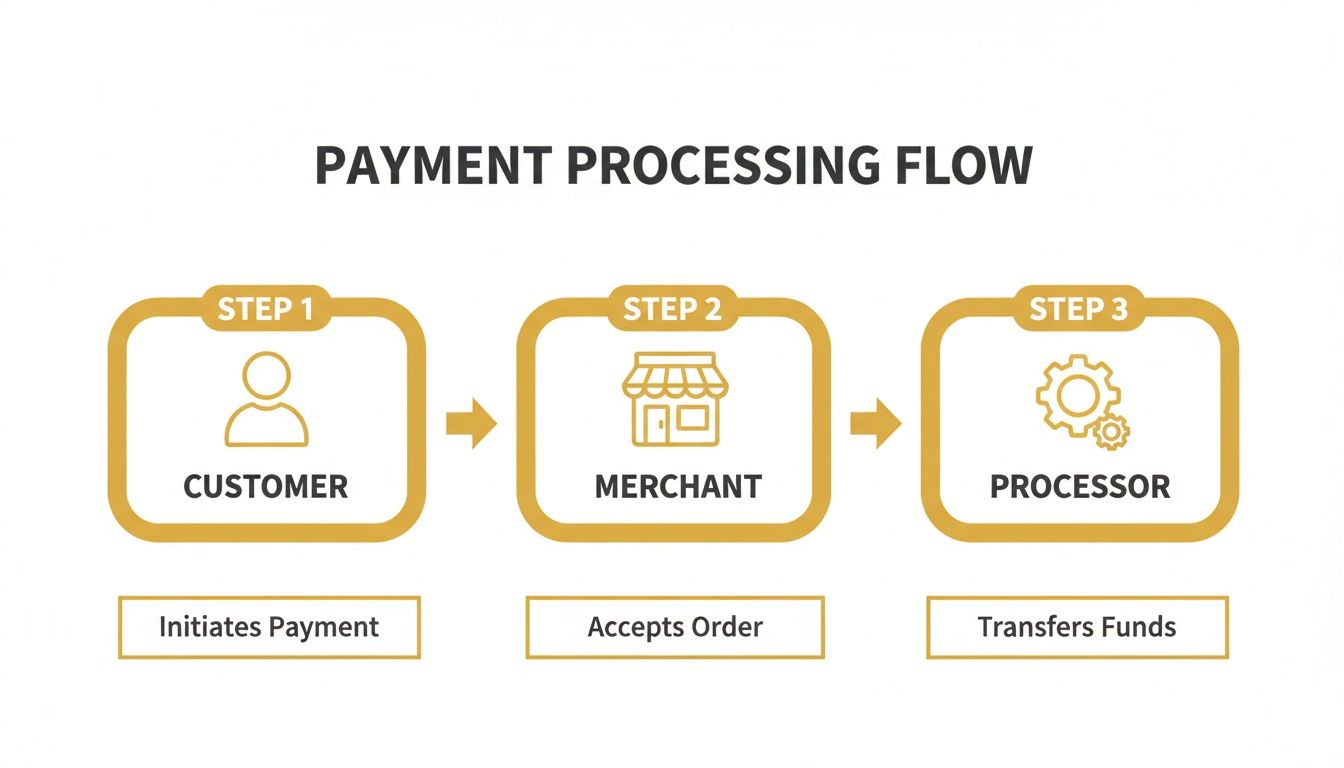
As you can see, the processor is the critical link that makes it possible for a customer's click to become a merchant's deposit.
Step 1: Authorization
First up is authorization. This is the gatekeeper moment—the instant check to see if the customer can actually make the purchase.
When your customer hits "pay," the payment gateway on your site instantly encrypts their card details and shoots them over to your payment processor. The processor then acts like a switchboard operator, routing the request through the correct card network (like Visa or Mastercard) to the bank that issued the customer's card.
In about two seconds, the customer's bank checks for sufficient funds or credit, runs a quick fraud scan, and sends a simple "yes" or "no" back down the line. That message pops up on your customer's screen, and just like that, the order is either confirmed or denied.
Step 2: Settlement
While authorization is a one-on-one conversation for each transaction, settlement is more like a company-wide meeting. At the end of the day, your processor gathers all of your approved authorizations and bundles them together into a single batch.
This batch file is then sent off to the card networks. They sort through everything, divvying up the transactions and sending them on to the correct issuing banks. This is the point where the banks officially pull the funds from their cardholders' accounts. It's an incredibly efficient system for handling the day's entire sales volume at once.
Think of it this way: Authorization is getting permission for each individual sale. Settlement is the after-hours process where all the banks actually sit down to square up the day's tab.
Step 3: Funding
The final act is funding, and it's the part you've been waiting for. This is when the money—minus the processing fees, of course—finally makes its way to you.
After settlement, your bank (the acquiring bank) collects all the funds from the various customer banks. Once your acquirer has the money in hand, it deposits the total into your business bank account.
This last step isn't always instant. Depending on your processor, industry, and risk profile, it can take anywhere from 24 to 72 hours for the funds to become available. With that deposit, the payment lifecycle is complete. A customer's click has officially become cash in the bank.
Processor vs. Gateway vs. Acquirer: Decoding the Roles
In the payments world, you’ll hear terms like "processor," "gateway," and "acquirer" thrown around, often as if they mean the same thing. They don't. Each one plays a distinct and critical role in the complex dance that gets money from your customer's bank account into yours.
Getting these roles straight is more than just semantics—it's essential for troubleshooting problems, choosing the right tech, and understanding your fees.
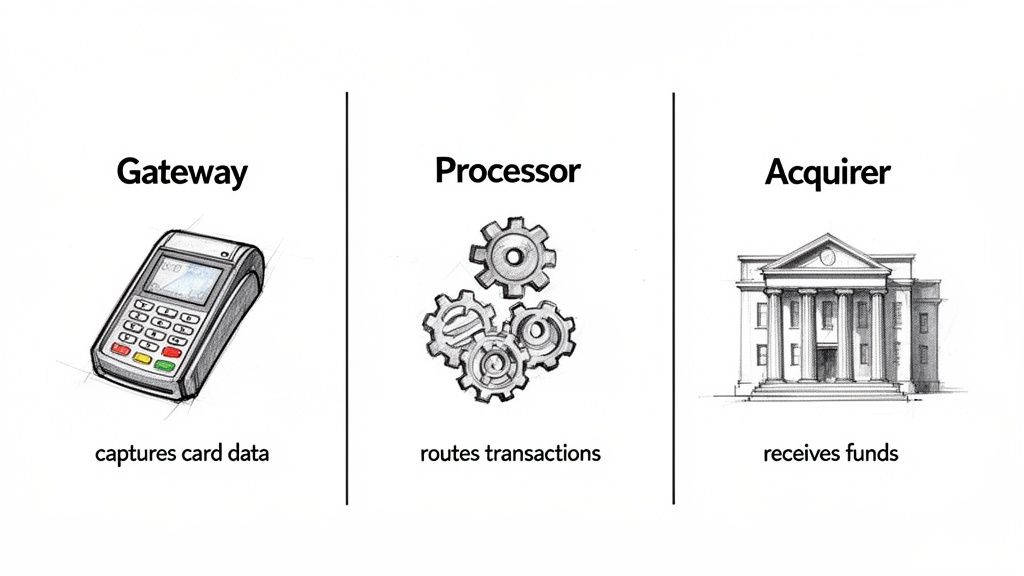
Think of the whole process like a sophisticated mail-delivery system.
The payment gateway is the secure, digital mailbox on your storefront. Whether it’s an online checkout form or a physical terminal at a counter, its one job is to securely grab the customer's card details and encrypt them for safe passage. It's the front door for the payment data, but it doesn't decide where the mail goes.
Once the data is securely captured, it’s handed off to the payment processor. The processor is the postal service in this analogy. It’s the technical engine that takes that encrypted information and communicates it to all the right parties—your bank, the card networks (like Visa or Mastercard), and the customer's bank. It handles the back-and-forth messaging required to get the transaction approved.
The Financial Foundation: Your Acquiring Bank
Finally, there’s the acquiring bank, sometimes called the merchant bank. This is the institution that underwrites your ability to accept card payments and provides you with a merchant account. It’s the final destination where the funds land after the processor has done its work.
The acquiring bank receives the money from the customer's bank (the issuing bank) and deposits it into your business account. They are the ones taking on the financial risk of your transactions.
While the gateway is the customer-facing "start button" and the processor is the technical messenger, the acquiring bank is the licensed financial institution that actually handles your money and underwrites the risk.
To make this even clearer, here’s a quick breakdown of who does what.
Payment Gateway vs Payment Processor vs Acquiring Bank
This table highlights the specific job each player has in a single transaction.
| Entity | Primary Function | Key Responsibility |
|---|---|---|
| Payment Gateway | Customer-Facing Interaction | Securely captures and encrypts customer payment data from the point of purchase (your website or POS terminal). |
| Payment Processor | Data Transmission & Communication | Routes the encrypted transaction data between the merchant, acquiring bank, card networks, and issuing bank. |
| Acquiring Bank | Financial Settlement & Risk | Provides the merchant account, receives settled funds from the issuing bank, and deposits them into your business account. |
It's true that many modern providers, like Stripe or PayPal, bundle all three of these functions into one neat package. This makes life much easier for merchants.
Even so, these distinct jobs are still happening behind the scenes. Understanding what a payment processor does versus a gateway or an acquirer helps you make much smarter decisions about your payment setup and who you choose to partner with.
Choosing the Right Payment Processor for Your Business
Picking a payment processor is more than just a technical task—it's a critical business decision that hits your bottom line and shapes your growth. Think of it like a partnership. The right one will feel like a seamless part of your operation, while the wrong one can frustrate customers and slowly bleed your revenue through sneaky fees.
They're definitely not all the same. Each processor offers a unique mix of features, pricing, and integration options designed for different kinds of businesses. A local coffee shop using Square for its simplicity has entirely different needs than a global e-commerce brand that relies on the deep customization of Stripe or Authorize.net.
Your choice will dictate everything from the fees you pay on every single sale to how well you can manage subscriptions or sell to customers overseas.
Comparing the Top Payment Processors
When you start looking around, you'll see a few big names pop up again and again. It helps to understand what makes each one tick and who they're best suited for. Each has carved out its own space by focusing on different merchant needs, whether that’s dead-simple setup, powerful tools for developers, or an all-in-one system.
Let's break down some of the most popular options:
- Stripe: A favorite among tech-focused businesses, SaaS companies, and anyone needing custom payment flows. Stripe is known for its incredible APIs and developer-first mentality. If you want to see it in action, you can walk through how to get started with Stripe here.
- PayPal: PayPal is an absolute giant, bringing instant brand recognition and trust to your checkout. As of January 2025, it dominated with a staggering 45% market share in online payment processing, leaving competitors far behind. Its main draw is its easy integration and the massive number of people who already have a PayPal account.
- Shopify Payments: If you run your store on Shopify, this is the native, built-in solution. Its biggest selling point is how smoothly it works with your store—no need to juggle a separate gateway and processor.
- Authorize.net: As one of the oldest and most trusted names in the game, Authorize.net offers reliability and flexibility. It acts as a gateway to connect your existing merchant account to your website and comes with some serious fraud-detection tools.
- Square: Famous for its little white card readers, Square has grown into a powerhouse for both in-person and online sales. It’s especially popular with small businesses, retailers, and service providers who need one system to manage everything.
Key Factors to Consider Before You Choose
Looking past the big names is crucial. You need to dig into how a processor’s structure actually fits with your business. The perfect processor for a subscription box service could be a terrible choice for a local restaurant.
Your sales volume, technical resources, and business model are the three most important factors in choosing a processor. A mismatch in any of these areas can lead to higher costs and operational headaches down the road.
Before you commit, take a hard look at these key areas:
- Fee Structure: Are they offering a flat-rate plan (like the common 2.9% + 30¢)? This is simple and predictable, but can get expensive as you grow. Or do they offer interchange-plus pricing? This model is more transparent and usually cheaper for businesses with high sales volume.
- Integration and Ease of Use: How well does it play with your other tools, like your e-commerce platform or accounting software? Is it a simple "plug-and-play" setup, or will you need to hire a developer to get it working?
- Business Model Suitability: Does the processor actually support what you do? This could mean anything from handling recurring billing for subscriptions, being comfortable with high-risk products, or accepting payments in different currencies for international customers.
The goal is to find a partner that not only works for you today but can also grow with you tomorrow.
Beyond the Transaction Fee: The Real Cost of Payment Processing
When you first start looking at payment processors, that main transaction fee—the simple percentage plus a few cents—is what usually grabs your attention. But that number is just the tip of the iceberg. The true cost of processing payments is often hidden in complex pricing models, and worse, in penalties that can quietly drain your profits.
To really get a handle on your expenses, you have to look past the advertised rate and understand how your processor actually bills you. They typically use one of three main models, and the one you end up with can have a massive impact on your bottom line.
Breaking Down the Pricing Models
Not all fee structures are built the same. What’s perfect for a brand-new coffee shop could be a disaster for an established e-commerce store.
Flat-Rate Pricing: This is the model you see everywhere, popularized by giants like Stripe and PayPal. You pay one simple, predictable rate on every single transaction (think 2.9% + $0.30). It’s incredibly easy to understand, which is its main appeal, but it can quickly become the most expensive option as your sales volume climbs.
Tiered Pricing: This model is a bit more complicated. It sorts your transactions into different buckets—usually called "qualified," "mid-qualified," and "non-qualified"—based on risk. A standard Visa or Mastercard from a consumer might get you the best rate, but a corporate rewards card could get bumped into a pricier tier. The problem is, the processor decides what goes where, and that lack of transparency can lead to some nasty surprises on your monthly statement.
Interchange-Plus Pricing: This is by far the most transparent model and often the most cost-effective for businesses doing serious volume. It separates the fee into two parts: the interchange fee (the non-negotiable rate that goes directly to the card-issuing bank) and a small, fixed markup for the processor. You see exactly what you’re paying for.
But here’s the thing: the biggest hidden cost isn't a fee at all. It's the financial fallout from chargebacks. Your processor is your gatekeeper, and if they think you're letting too many disputes through, the consequences can be brutal.
The Real Danger: Chargeback Penalties
This is where your relationship with your payment processor gets personal. A high chargeback rate is a massive red flag, telling them your business is a financial risk. They’ll move quickly to protect themselves, and that almost always means financial pain for you.
If your chargeback ratio starts creeping up, your processor can hit you with higher transaction fees, lock up a chunk of your money in a reserve account, or—the ultimate nightmare—shut down your merchant account completely. Getting your account terminated can literally put you out of business overnight.
The payment processing world is growing like crazy, expected to hit USD 1,051.93 billion by 2035. But with that growth comes a laser focus on fraud, which now impacts a staggering 71% of firms. You can dig deeper into the payment processing market's explosive growth and associated risks to see just how high the stakes are.
This is exactly why you can't afford to be passive about disputes. Using a chargeback alert system stops disputes from turning into official chargebacks in the first place, protecting your merchant account and keeping you in good standing. You can see how this works by checking out the different pricing plans for chargeback alerts and find one that helps safeguard your revenue.
How to Protect Your Merchant Account from Chargebacks
Think of chargebacks as a direct threat to the health of your relationship with your payment processor. They aren't just about lost sales; each dispute filed against you chips away at your processing history, pushing your business closer to serious, often costly, penalties. Defending your merchant account isn't just a good idea—it’s a fundamental part of staying in business.
The best defense is a good offense. The most effective strategy you can have is to stop disputes from ever becoming formal chargebacks in the first place. This is exactly where modern chargeback alert systems step in.
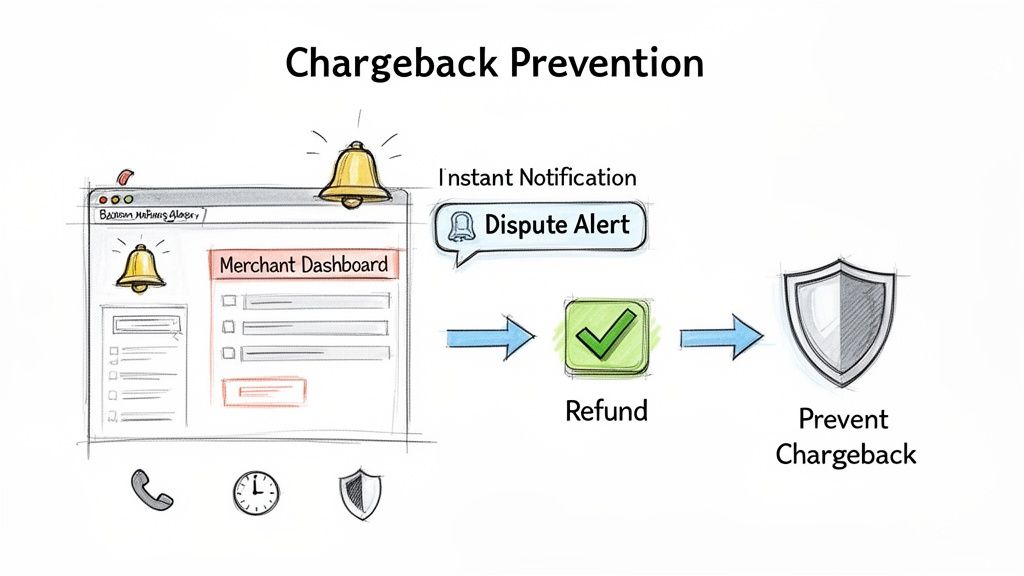
These platforms plug directly into the major card networks, like Visa and Mastercard. The very moment a customer calls their bank to question one of your charges, the system fires off an instant notification straight to you. This alert opens up a crucial, but brief, window of opportunity to take action.
Turning a Dispute into a Resolution
Instead of passively waiting for that customer complaint to morph into a damaging chargeback on your record, you get the chance to step in and issue a refund immediately. It’s a simple move, but it completely changes the game. You resolve the customer's problem on the spot and prevent the dispute from ever being officially filed against your merchant account.
By deflecting the dispute, you're directly protecting your chargeback ratio. This is the single most important number your payment processor looks at to judge how risky your business is. Keeping that ratio low is absolutely critical.
A proactive alert system basically acts as a shield for your merchant account. It gives you the power to neutralize a threat before it can do any real harm, preserving your good standing and your ability to process payments without a hitch.
Keeping your account in good standing helps you sidestep some truly painful outcomes:
- Crippling Penalties: Processors hit you with hefty fees for every single chargeback you receive. These add up fast.
- Frozen Funds: If your dispute ratio creeps up, your processor might place a "reserve" on your account, holding back a percentage of your daily revenue as collateral.
- Account Termination: This is the worst-case scenario. The processor can decide you're too high-risk and shut down your account, leaving you unable to accept payments.
Strengthening Your Defenses
A huge piece of the puzzle is understanding what a data breach is and how to prevent one. Why? Because stolen payment information is a massive source of fraudulent transactions that almost always turn into chargebacks. Stronger data security means fewer unauthorized charges to begin with.
For any online business doing significant volume, this proactive approach isn't optional. It flips chargeback management on its head—from a reactive, expensive, and stressful battle into a controlled, automated process. You can even explore how chargeback representment services can bolster your defense, helping you fight the disputes you can’t prevent.
Ultimately, by using alerts to keep disputes from becoming chargebacks, you send a clear message to your payment processor: you're a reliable, low-risk partner they can count on.
Got Questions? We've Got Answers
Diving into the world of payment processing always brings up a few questions. Let's tackle some of the most common ones we hear from business owners trying to get a handle on their payments.
Is It a Hassle to Switch Payment Processors?
Honestly? It can be. Switching isn't just a matter of flipping a switch, especially if you have customers on recurring subscriptions or have their payment info saved.
Moving that sensitive data from one provider to another, a process known as data portability, can get technical fast. While some processors will help, it often requires a decent amount of work from your end. That's why it’s so important to pick a partner who can grow with you from the start—it'll save you a major headache down the road.
What's the Deal with High-Risk vs. Low-Risk Processors?
Think of it like this: not all businesses carry the same amount of risk in the eyes of a payment processor.
- A high-risk processor works with industries that naturally see more chargebacks—think businesses selling supplements, travel packages, or digital goods. They charge higher fees to cover that extra risk but are generally more understanding if your dispute numbers are a bit elevated.
- A low-risk processor is for your everyday retail or standard e-commerce shop. Their fees are lower, but they have much stricter rules. If you get too many chargebacks, they might shut your account down, forcing you to find a high-risk provider anyway.
Why Is My Processor Holding My Money?
It’s incredibly frustrating, but processors will sometimes place a hold on your funds (this is called a "reserve"). They do this when they think your account is looking risky.
What triggers a reserve? It could be a sudden, unexpected spike in sales, a rising chargeback rate, or simply the fact that you're in a high-risk industry. This reserve is basically their security deposit to cover any potential chargebacks they think are coming. To get ahead of this, a solid understanding of fraud detection in online payments is your best defense.
The best way to keep your processor happy and your cash flowing is to be proactive about disputes. Using a tool that sends you chargeback alerts lets you handle a problem before it hurts your account. Disputely gives you those real-time alerts, so you can issue a refund and prevent a damaging chargeback from ever happening. It's how smart merchants protect their revenue and keep their accounts in perfect standing. See how you can cut chargebacks by up to 99% at https://www.disputely.com.


