
Card Verification Code Mastercard: Where to Find It

For an online Mastercard purchase, the verification code is the three-digit CVC2 printed on the signature panel on the back of the card, after the card number. It's the code you enter at checkout, not the verification data stored in the chip or magnetic stripe.
If that code matches, why can the cardholder still dispute the payment? Because matching card data isn't the same as customer authorization. For merchants, that distinction determines how to handle checkout results, subscription billing, and complaints after a sale.
Where to Find Your Mastercard Verification Code
For an online or phone purchase, look for CVC2 on the back signature panel. Don't search the front for a longer number or enter part of your card number in the security-code field.
The payment situation tells you which verification value matters.
Which verification code applies to each payment situation
| Payment situation | Code used | Where the value appears | Visible to cardholder |
|---|---|---|---|
| Online or phone purchase | CVC2 | Three digits on the back signature panel | Yes |
| In-store chip transaction | Chip CVC | Stored inside the chip | No |
| In-store swipe (magnetic stripe) | CVC1 | Encoded in the stripe on Tracks 1 and 2 | No |
| Virtual card in a banking app | CVC2 | Usually shown in the issuer app | Yes |
The chip and stripe values aren't printed for you to read. You don't need to retrieve them, and an online checkout shouldn't ask you to find them.
Checks before you submit payment
- Turn the card over. Find the separate security code near the signature panel, after the card number where that layout is used.
- Enter it exactly as printed. Don't add spaces or substitute your PIN.
- Use your current card. If the issuer replaced your card, read the replacement's code rather than relying on a remembered value.
If the printing is unreadable, contact the issuer through your banking app or its established support channel. Don't guess repeatedly or send a photograph of both sides of your card to a merchant's support inbox.
How CVC1, CVC2 and Chip CVC Differ
Think of a Mastercard as carrying several locks, each built for a different door. The magnetic stripe serves one in-person payment route, the chip serves another, and the printed code supports purchases where the merchant doesn't read the physical card.
These aren't interchangeable names for the same value. Their placement and use determine which check the payment system can perform.
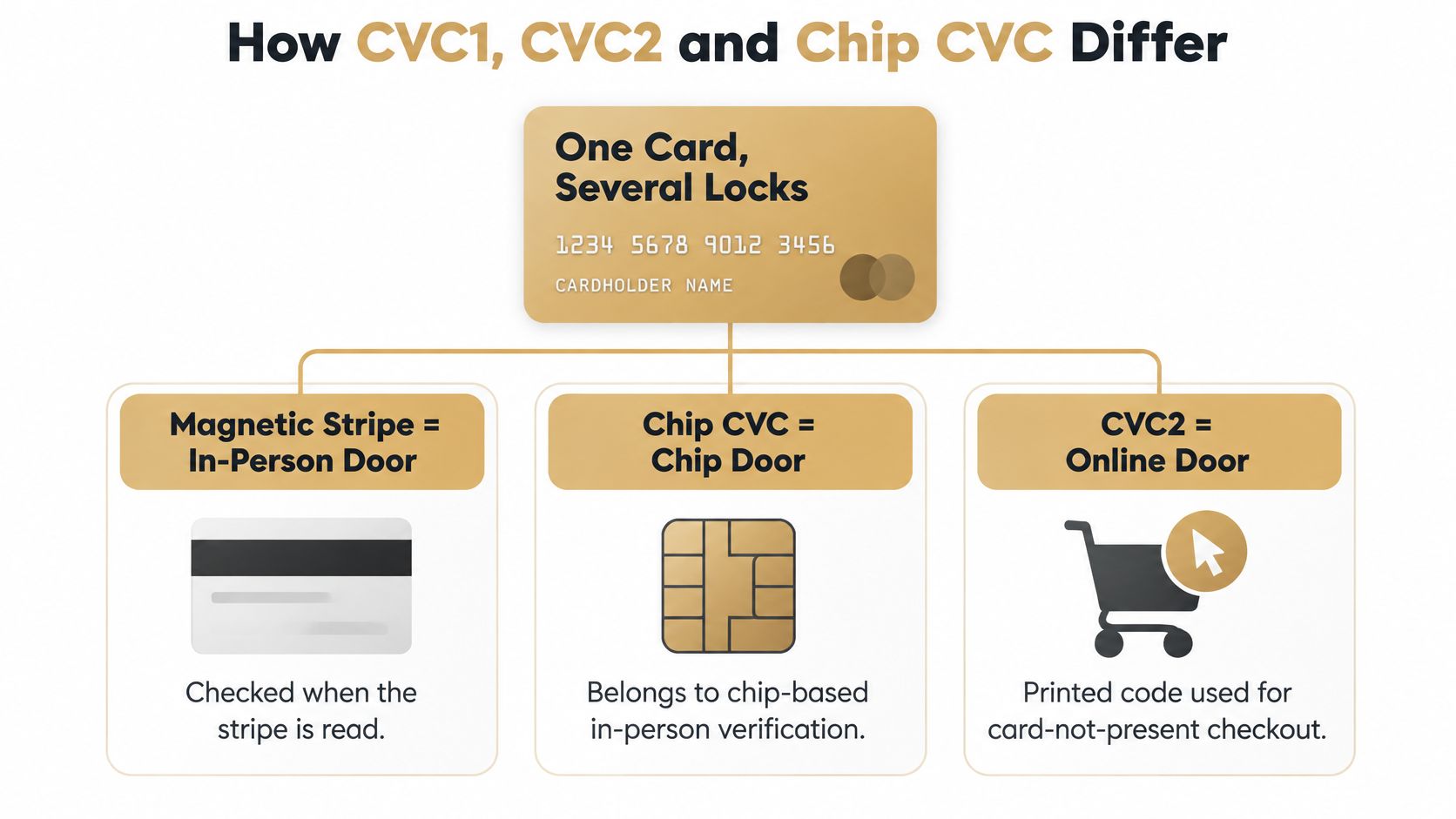
The stripe and chip values
Under Mastercard's security rules, CVC1 occupies three contiguous positions in the discretionary data field on Tracks 1 and 2, while Chip CVC sits in Track 2 Equivalent Data and must differ from CVC1.
The technical field names describe where payment equipment finds the values. A cardholder doesn't type either one into a checkout form. When a terminal reads the stripe or chip, the payment infrastructure handles the relevant card data.
That separation matters. A value associated with a stripe transaction isn't a substitute for the printed code requested during an online purchase. Likewise, Chip CVC isn't the printed security code copied into the chip.
The printed checkout value
CVC2 belongs to card-not-present payments, including ecommerce and telephone orders. The merchant receives the value from the customer and can request verification against the issuer's record.
A checkout form may label its field security code, CVC, or CVV. For a Mastercard online purchase, the customer-facing value being requested is CVC2, regardless of the form's shorthand.
Practical rule: Match the verification method to the payment channel. Don't treat a chip transaction result as evidence that someone authorized a separate online order.
For merchants, precise terminology also improves troubleshooting. A support ticket saying that the customer's security code failed should identify an online CVC2 problem, not send developers searching through chip-terminal settings. For cardholders, the distinction is simpler: CVC2 is the value you manually enter; the terminal handles the other variants.
How Issuers Respond to a CVC2 Check
The merchant doesn't decide whether the submitted code matches the bank's record. The issuer performs that comparison, then returns a verification outcome through the payment system.
The authorization path looks like this:
- The customer enters payment details. At checkout, they provide the card number, expiry date, and requested CVC2.
- The gateway or acquirer sends the request. According to Mastercard's transaction-processing rules, the acquirer transmits CVC2 in ISO 8583 Data Element 48, subelement 92, and the issuer returns the result in Data Element 48, subelement 87.
- The issuer compares the value. It checks the submitted code against its own record.
- The merchant receives the response. The payment integration exposes the verification outcome alongside the authorization information.
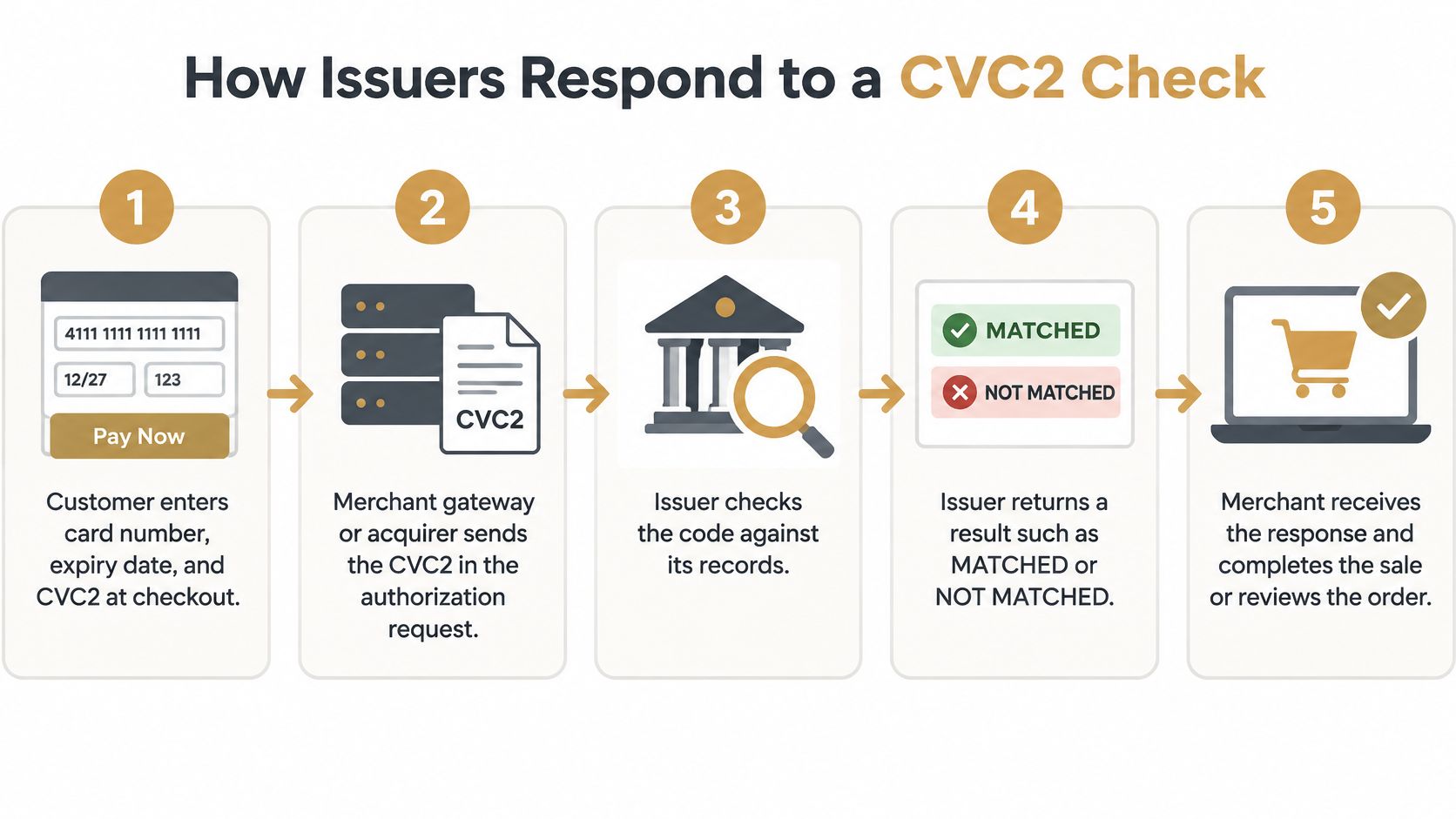
Turn the result into an action
CVC2 outcome codes and the merchant response to each
| Outcome | Meaning | Merchant response |
|---|---|---|
| MATCHED | The submitted value agrees with the issuer's record | Continue with other risk signals |
| NOT_MATCHED | The submitted value disagrees with the issuer's record | Treat as a decline for ecommerce orders; don't retry with guessed codes |
| NOT_VERIFIED | The issuer couldn't perform the check | Treat as unknown, not as a mismatch; weigh other signals |
MATCHED isn't an instruction to ignore everything else. An unfamiliar device, unusual delivery request, or suspicious pattern of attempts still deserves attention.
For a transmitted mismatch, Mastercard requires the issuer to decline the applicable ecommerce, mail-order, or telephone-order authorization. Don't build a fallback that cycles through guessed codes. Repeated attempts also deserve investigation, and MANDATE's guide to card testing provides useful context for recognizing attempts to validate stolen payment details.
NOT_VERIFIED needs a different rule. It means the check wasn't completed, not that the customer entered an incorrect value. Consider address verification, device reputation, attempt frequency, IP geography, and order value; this explanation of a credit card AVS check helps distinguish an address result from a code result.
Say an unfamiliar customer places an unusually valuable order from a new device and receives NOT_VERIFIED. Additional authentication or manual review is more appropriate than labeling the code incorrect. Your review should address the combined risk, not invent certainty from an unknown result.
Record the verification outcome for operational review, never the submitted CVC value itself.
Why a Matching Code Does Not Stop Disputes
A common assumption is that a correct security code makes a purchase safe. Consider a fraudster who obtains a stolen card number and its matching printed code: the issuer returns MATCHED, the payment is approved, and the cardholder later disputes the charge.
The code check worked. It never established who typed the code. Possession of correct payment details and permission to use them are different things.
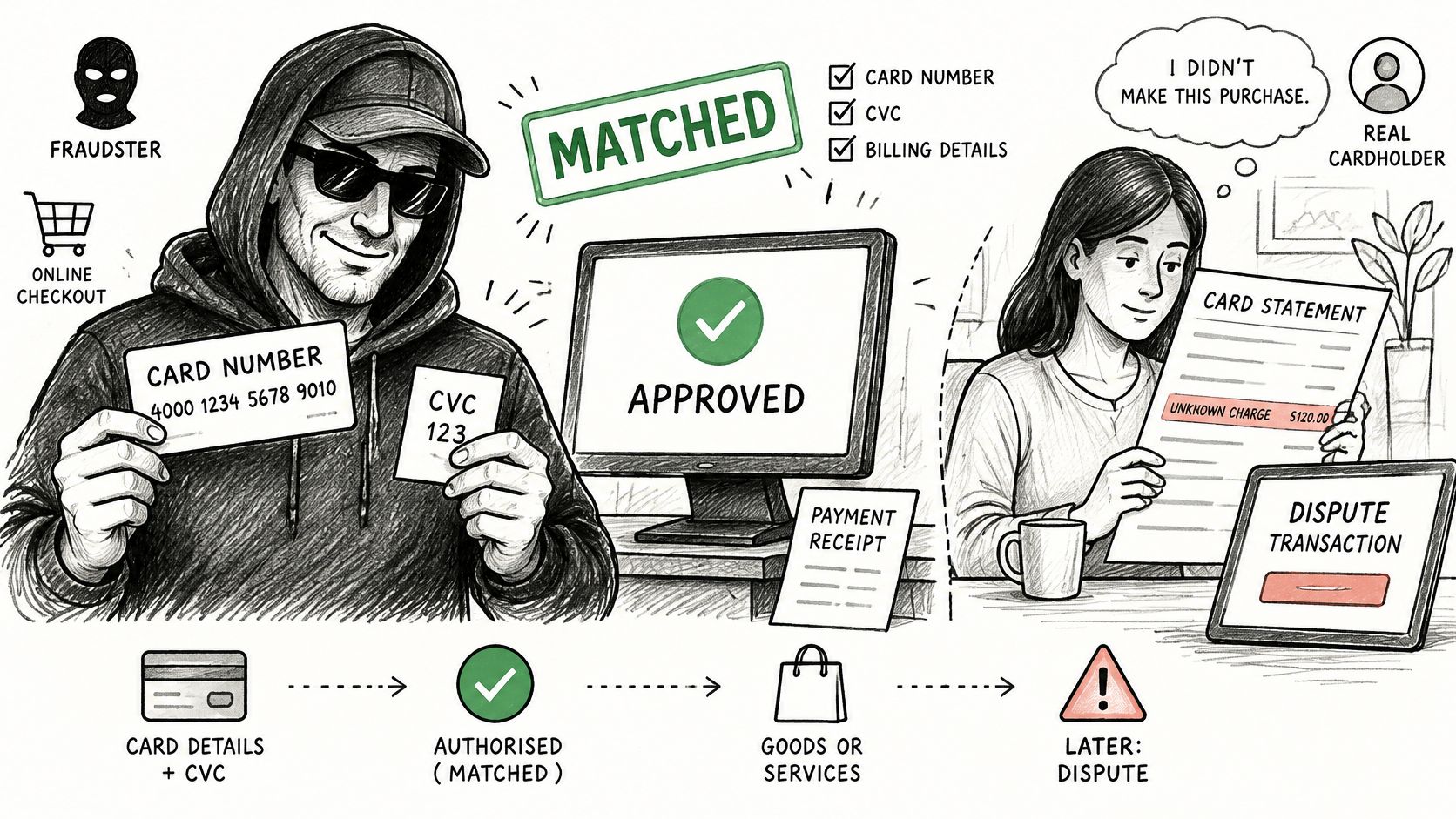
Validation isn't consumer authentication
Mastercard's Account Validation documentation describes checking supplied CVC/CVV against issuer records and treats CVC as optional in some validation flows, rather than a standalone decision rule. EMV 3-D Secure addresses consumer authentication using transaction, payment-method, and device information.
That distinction matters when choosing controls. A merchant considering stronger authentication should understand how 3-D Secure authentication works, rather than assuming that another request for the printed code provides equivalent protection.
Neither control eliminates disputes about subscription confusion, dissatisfaction, cancellation, or an expected refund. A matching CVC also doesn't, by itself, guarantee liability protection.
A valid payment can still become a disputed purchase.
Prevention continues after checkout
Requiring CVC everywhere can add friction without resolving the reason a customer later complains. Risk-based authentication lets you apply stronger checks to unusual orders while keeping familiar, lower-risk purchases straightforward.
After payment, give customers practical ways to recognize and resolve the purchase:
- Recognizable descriptors. Use a statement description customers can connect to your storefront.
- Clear renewal communication. Explain upcoming subscription charges and provide accessible cancellation.
- Fulfillment evidence. Retain delivery records and relevant customer correspondence.
- Prompt resolution. Handle justified refunds quickly and assign incoming dispute alerts to an accountable owner.
These measures address problems the code can't detect. A customer who forgot a renewal needs clear billing communication, not proof that their original checkout contained the right security code.
Storing CVC Data for Subscriptions and Card on File
You may collect CVC2 to authorize a specific transaction, but you must not retain it afterward, even encrypted. Saving it for convenience, customer support, or the next renewal doesn't create an exception.
PCI Security Standards Council guidance classifies CVC2 and equivalent security codes as sensitive authentication data. Keeping those values would make a compromised database more useful to someone attempting card-not-present purchases.
Mastercard's transaction-processing rules likewise prohibit CVC2 storage by the merchant, acquirer, or service provider. Subscription billing isn't a reason to preserve it.
Build the initial payment and renewal separately
- Request CVC2 during initial checkout when appropriate. Collect it through the payment flow, not a customer-service message.
- Use the issuer's response. Apply your authorization and fraud-review rules to the result.
- Remove the submitted value. Ensure it doesn't remain in databases, caches, logs, support tools, or captured request payloads.
- Use permitted credentials for renewals. Subsequent billing should rely on stored payment credentials, network tokens, account-updater information, or other permitted transaction data.
The distinction is between keeping a reusable payment credential and keeping sensitive authentication data. A card-on-file payment flow should support the former without preserving the latter.
What a merchant may keep after authorization
| Data item | Keep after authorization? | Used for renewals |
|---|---|---|
| CVC2, CVV2, CAV2 or CID | No, even if encrypted | Never used |
| Stored card credential (encrypted card number) | Yes, under PCI DSS controls | Yes, for recurring charges |
| Network token | Yes | Yes, for recurring charges |
| Account updater data | Yes, when the network supplies it | Refreshes expired or replaced card details |
Check the hidden copies
Deleting a database field isn't enough if an application logger recorded the checkout request. Inspect error reporting, session-replay configuration, support attachments, analytics events, and exported debugging files.
A useful test is to trace the payment field through the integration without using real customer security codes. Identify every service that receives the field and confirm that none retains it after authorization.
A renewal system that retrieves a saved CVC has a compliance problem, not a useful feature. Remove that dependency rather than disguising the stored value with encryption or restricted staff access.
Set Your CVC Policy and Daily Handling
Write a policy that checkout developers, fraud reviewers, and support agents can apply without improvising. Assign a named owner to each decision so that a gateway setting doesn't become the business's entire fraud strategy.
- Choose when to request CVC2. Define the eligible card-not-present checkout flows and any risk-based exceptions. Keep recurring billing separate from customer-initiated checkout.
- Map outcomes to written actions. Give staff an explicit path for matched, mismatched, and unverified results. Specify when an unfamiliar or unusually valuable order needs additional authentication or manual review.
- Verify data handling. Confirm that codes don't enter persistent logs, emails, support tickets, or webhook payloads. Document which stored credential or token supports renewals.
- Assign post-purchase responsibilities. Name who maintains descriptors, sends renewal notices, handles cancellation, preserves fulfillment evidence, and responds to refund requests and alerts.
Make review part of normal operations
Review your verification-outcome mix against dispute reason codes each week. Look for actionable differences: Are unverified results being rejected without review? Are matched orders producing complaints because customers don't recognize the billing descriptor?
Keep appropriate order evidence, including relevant device information, fulfillment records, and customer messages, under your retention and access policies. Don't use a CVC match as a substitute for records showing what the customer bought and how you fulfilled it.
For the post-purchase response, we connect to Stripe, PayPal, Shopify Payments, or any other payment processor, and work with Ethoca, Verifi RDR, and CDRN alerts. That adds an alert-handling process alongside checkout verification rather than replacing it.
Keep support away from security codes
Common mistakes include asking customers to email their CVC, including it in confirmation messages, and treating MATCHED as conclusive proof of authorization. Training should prohibit those practices explicitly, not merely advise staff to handle payment details carefully.
For example, a support agent can locate an order using its order number, confirm relevant delivery information, and refer to the card's masked ending without requesting the CVC. Those details help locate the transaction; they shouldn't be treated as sufficient authentication for every sensitive account change.
Write your checkout, outcome-handling, retention, and post-purchase policy this week. Share it with the checkout, refunds, and support teams, then test a sample order through each team's workflow.
We offer dispute alerts and chargeback-prevention handling to address the risks that remain after a CVC check. Visit Disputely to connect your payment processor with no coding required and set refund rules for incoming alerts.


